AI governance in design tools: What happens to your data when AI enters the workflow
AI is built into your design tools, but do you know where your data goes? Learn how AI governance frameworks protect your IP, privacy, and compliance.

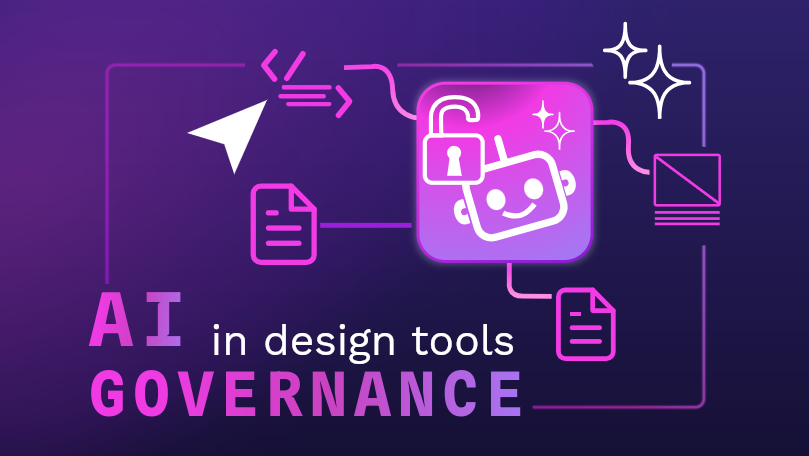
AI is enmeshed in the tools and processes organizations use daily. McKinsey estimates that 88% of companies use AI in their existing workflows, but 44% are uneasy about regulations, ethics, or legality.
Design tools are a prime example of this. AI-assisted features are increasingly built into the platforms teams use for wireframing, prototyping, and handoff, often without much visibility into what's happening under the hood. That lack of visibility makes it harder to investigate mistakes, meet compliance requirements, or answer customer questions about how their data was handled.
AI governance addresses these concerns directly. Rather than leaving AI use implicit in your tools and workflows, good governance helps make it documented, traceable, and accountable. It won't eliminate every data or privacy concern, but it gives your organization a clear foundation for addressing them head-on.
What is AI governance?
AI governance is the set of policies, processes, and controls that define how AI can be used in an organization, what data it can touch, and how its behavior is monitored over time. In other words, it's what transforms AI from an unexamined part of your workflow into something documented and accountable.
Good governance frameworks do this by mapping your workflows, marking which steps involve AI, and tracking what happens to data along the way. In practice, this means you can point to any stage of a process and know whether AI was involved, even when it's running quietly in the background of a tool your team uses every day.
How AI governance affects digital product teams
AI governance concerns are especially important for product design and development teams because they touch almost every stage of a product development’s life cycle.
When the boundaries are unclear, digital product teams are left guessing what AI touched, which decisions were influenced, and where the risks are. When governance is in place, they have explicit guardrails for when to use AI and how those decisions will be checked later.
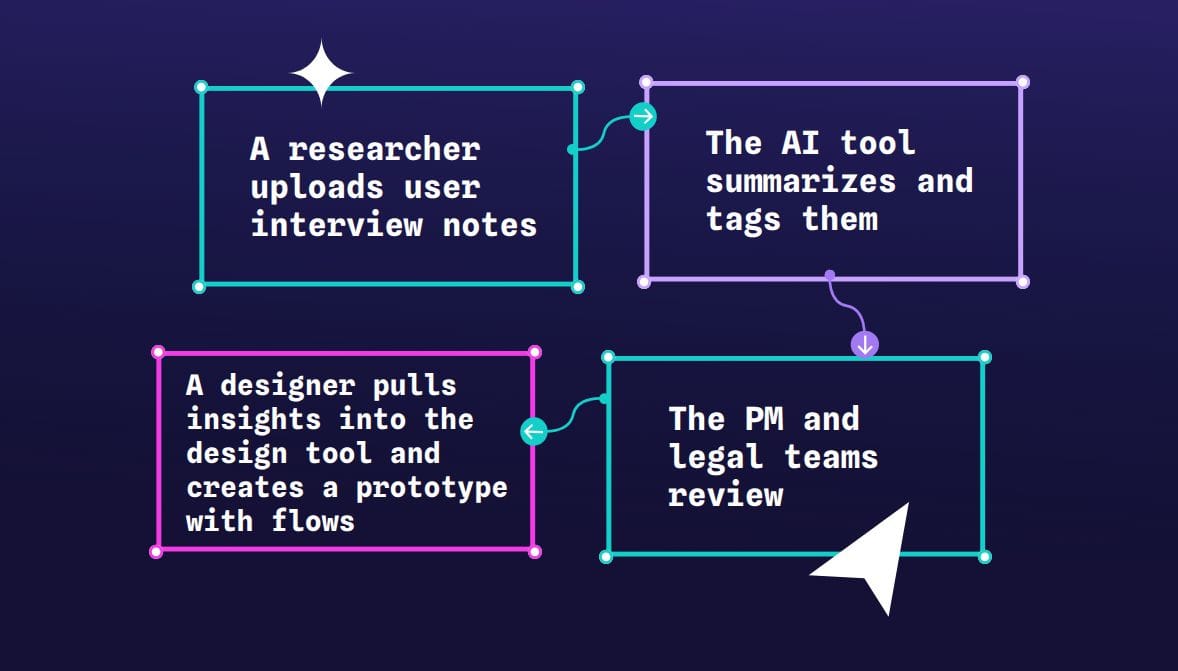
Consider a typical design review flow:
- A researcher uploads user interview notes
- The AI tool summarizes and tags them
- A designer pulls insights into the design tool and creates a prototype with flows
- The PM and legal teams review
Without AI governance, it’s hard to tell what AI saw, accessed, and generated, along with who is ultimately responsible for checking it. It’s then nearly impossible to investigate issues or prove you handled data correctly. As more teams become involved, these capabilities only become more crucial.
With AI governance, you would mark the “summarize and tag” step as an AI system, dictating what data it can access. After each AI run, you would keep enough detail to trace the outputs back and explain the results if something goes wrong. There’s no guessing what AI did and what humans did (an important distinction for audit trails).
When you zoom out from a single design review and look at the full product workflow, AI governance only works if every team knows how they fit into it. Each department would have its own connection to the governance, as well:
- UI and UX Design would know what they can send to AI assistance and where the design history is logged.
- Engineering and DevOps would know where AI services run, how API keys and models are managed, and how logs and model calls are monitored.
- DesignOps would set standards for which AI features are allowed, along with workflow templates, training, and enablement.
- IT and security would manage residency, network boundaries, SSO, and access controls, as well as whether tools are self-hosted or on a vendor cloud.
AI governance acknowledges that even a simple request for AI to “summarize this user interview” can have far-reaching legal, privacy, and product implications for the entire digital product team, not just the person who clicked the button.
Four critical AI governance risks in design tools
AI features can add much-needed functionality and scalability to your existing tech stack, but they also come with additional responsibilities. Without tackling these issues head-on, you put your organization at risk of data exposure, compliance failures, and reputational damage.
These are the pressure points where AI governance most often fails for digital product teams, which is why the following risks matter so much.
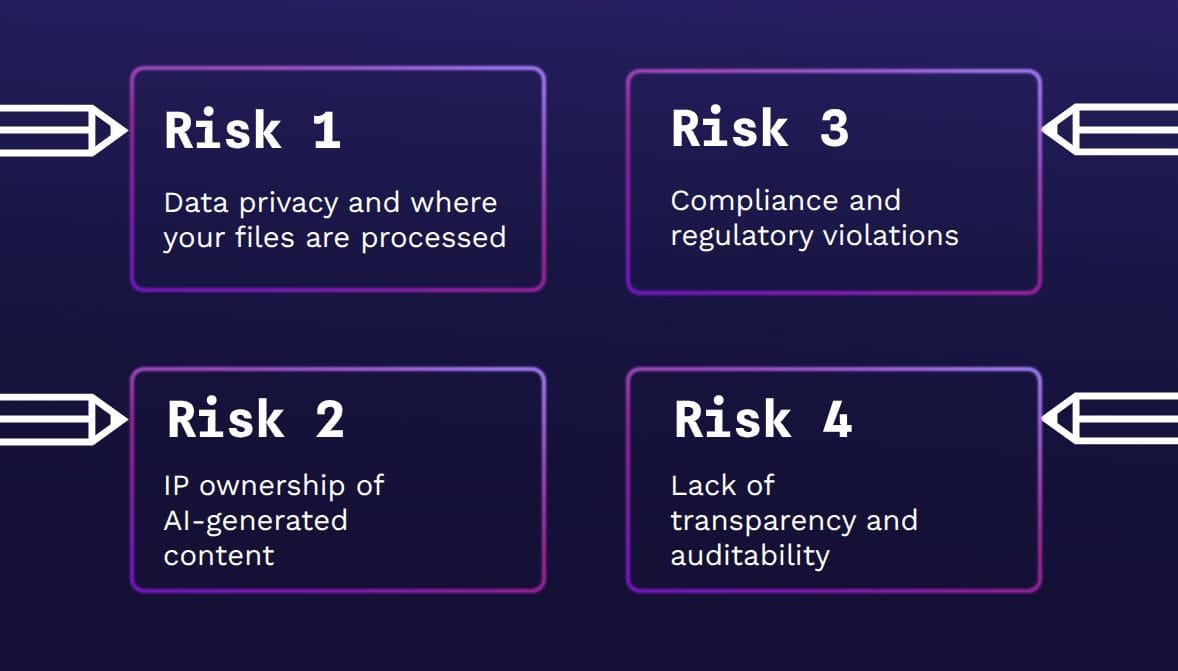
Risk 1: Data privacy and where your files are processed
Do you know where your data is being used? If AI features run in a vendor’s cloud, your prompts, files, and logs are pulled into their infrastructure and AI servers, which means they decide how that environment is secured and where your data lives. That’s worrying when you can’t see which regions they use, how long data is retained, or who else inside their ecosystem can access it.
Imagine a team uploading user interview notes that include names, emails, and screenshots of internal tools into an AI “summarize” feature. If that feature runs in a vendor’s cloud under broad data‑use terms or on a consumer‑grade plan, those details could end up stored in regions the team didn’t intend or reused for model training in ways they did not anticipate.
With infrastructure‑level control through self‑hosting or a tightly scoped private cloud, you choose where inference runs, which regions are allowed, and how you monitor and log data flows. That control can make it easier to demonstrate where regulated data was processed, especially when SaaS vendors do not provide sufficient transparency or exportable logs.
Risk 2: IP ownership of AI-generated content
It’s genuinely hard to pin down who owns designs and other IP created with the help of AI tools. Recent U.S. decisions confirm that an AI system itself cannot be treated as a legal “author,” and works generated entirely by AI do not qualify for copyright protection. But even where human authorship exists, ownership of prompts, outputs, and training data often depends on the fine print in your vendor’s terms rather than any right you can take for granted.
That broader gray zone matters because, without clear contractual language, it may be difficult to prove that you (and not your vendors or model providers) own specific AI‑assisted designs. It may also be hard to stop those assets from being reused for training or other purposes you did not intend.
To manage this risk, treat IP terms as a non‑negotiable part of adopting any AI feature. Ask vendors to state, in writing, who owns AI-assisted outputs, how they handle prompts and training data, and whether they train models on your content. Where possible, choose tools or deployment models that give you explicit IP ownership and enough transparency to show which parts of a design were human-created versus generated by AI.
Risk 3: Compliance and regulatory violations
You’re probably already checking for compliance with your vendors, but AI features make this much harder when they touch regulated data. For example, GDPR and CCPA require you to know where personal data is processed, how long it’s retained, and who can access it. Sector rules like HIPAA or financial rules add more layers for any health or payment data.
Each new AI feature a vendor bolts on adds more responsibility to log and track data. A simple “We’re compliant” statement on a marketing page isn’t enough to demonstrate compliance.
Since design files and research artifacts can include personal data, health or financial information, and customer identifiers, they can fall under frameworks like GDPR, CCPA, or HIPAA. When AI vendors cannot clearly explain their model providers or subprocessors, you risk losing visibility into where that regulated data flows or resides.
Risk 4: Lack of transparency and auditability
If you have no reliable way to see when AI was used, on which assets, and with what configuration, you will struggle to credibly audit incidents, answer regulator questions, or enforce internal AI policies. Unfortunately, many of the AI features with the least friction (like a “click here, magic happens” button) may also be the least transparent.
Without seeing when AI was used, on which files, and by whom, it is very hard to credibly claim full transparency and auditability. Design tools that are used with sensitive or regulated data are increasingly expected to offer clear, inspectable paths for security teams to verify where data has traveled.
How to create an AI governance framework for your design and development teams
An AI governance framework should be living, easy to update, and reflective of your actual tech stack usage because your tech stack and regulations will keep changing. If governance is frozen in a PDF, it will quickly become outdated compared to how teams really work. Use these steps to create documentation of real decisions, tools, and workflows that can be adjusted in real time, so policies and workflows stay in sync.
1. Define scope and owners
Go through all your workflows to map where AI already appears in design and development work, from research to handoff. (Examples may include interview synthesis, wireframing, content generation, and design-to-code handoff). Assign a point person to be accountable for keeping this map current, then involve leaders in DesignOps, security, legal, and IT.
Since each of them owns a different part of the risk, it makes sense to have them partner in the overall plan of how data is used, shared, and stored via AI-enabled systems.
2. Classify design data and set guardrails
Create a simple scheme for data types, such as public, internal, proprietary, or restricted, and communicate how to decide on each designation.
For example:
Public: mockups and website UI
Internal: In-product copy drafts and generic component libraries
Proprietary: Unreleased feature designs and brand systems
Restricted: User interview notes or screenshots containing customer data
Decide which categories must stay within your environment, which can never touch external AI, and which can be freely shared with vetted, trusted vendors.
3. Standardize vendor and feature evaluation
Start by creating a shared checklist for any AI-enabled tool, covering:
- How it uses data for training
- Where processing happens
- Which subprocessors are involved
- What gets logged
- What opt‑out controls exist
- Whether self‑hosting or private deployments are possible
Share this checklist with design leadership, DesignOps, security, legal, and IT so they can review new tools against the same criteria instead of doing one‑off approvals.
When a new AI feature or vendor comes in, the requesting team fills out the checklist, the relevant stakeholders review and either approve, reject, or approve with conditions, and the results are stored somewhere visible (like your internal wiki). This way, future evaluations can build on past decisions.
4. Embed controls and keep improving
As you decide how to handle various AI technologies, turn these decisions into defaults for new products. For example, use role‑based access so only certain roles can run AI on restricted research data, and introduce AI‑safe templates (preconfigured project or file templates that block restricted fields from being sent to AI features by default).
You can also wire these rules into your CI/CD or release process, so a design or feature that uses AI in a new way triggers an automatic review rather than going straight to production.
The goal is to make the safest option the one designers and developers actually use when they do their normal work, not an extra step they have to remember. Over time, review logs, incident reports, and new industry guidance to adjust these controls so they reflect how your teams use AI today, not how you imagined it a year ago.
Penpot's approach to AI governance and transparency
Most design tools give you AI features as part of a managed SaaS stack. Click the AI feature button, and your data goes to a vendor-chosen model in their cloud, where you may have limited ability to configure, monitor, or inspect it.
Penpot, on the other hand, treats AI as something you connect on your own terms and it is an opt-in capability within the platform, meaning that you choose to enable or disable it as you please. AI is connected through open protocols. This means you can plug in vetted and approved AI agents instead of accepting a single, fixed model behind a proprietary integration.
Penpot’s file formats follow open standards and can be downloaded, inspected, and integrated into existing workflows. This way, security and platform teams can bring design artifacts into their own logging, version control, and review processes, no matter if the workflows use AI or not.
Juan de la Cruz, Designer at Penpot, explains in this video a real workflow of the Penpot MCP Server inside Penpot. Not just generating random UI, but giving AI agents access to the actual design context: layers, components, tokens, pages, layouts, and design systems.
The Penpot MCP server extends this into the AI layer. MCP is an open standard that lets AI tools communicate with other software in a structured, inspectable way — think of it as a controlled handshake between your design environment and any AI agent your organization has approved. Deployed inside a company's own environment, it can be restricted to approved models, with the option to swap or self‑host LLMs without rewriting design workflows or handing control to a single vendor.
In practice, these Penpot features make it easier to enforce code review and internal audits while still giving engineering and product teams room to experiment with AI. AI behavior can be traced and verified against data on internal servers, which makes it easier to align your design workflows with the governance practices described above instead of fighting against opaque or hard‑to‑audit integrations.
Design and develop responsibly with Penpot
With a better understanding of AI governance, you won’t see any software platform as “just a tool” but as an active participant in your data-handling and decision-making processes. Design platforms are no different and should be treated as part of your overall governance framework.
Penpot’s open-source, self-hostable platform lets you run AI processes in accordance with your internal AI governance terms, not the vendor's. It’s ideal for avoiding “black box” situations where AI use isn’t obvious or governable. Instead, you can design within your own infrastructure, align with existing AI policies, and give your IT and compliance teams the visibility they expect for any critical system.
If you’re ready to treat design as part of your governed digital product infrastructure (and not an exception), Penpot gives you a platform that can grow with your AI policies. Talk to Penpot about enterprise options today and start designing and developing responsibly from day one.
FAQs
Who should own AI governance for design tools in our organization?
While there should be a clearly accountable leader for oversight and planning of AI governance (usually a senior product or technology leader), it should be executed across teams. In practice, design leadership, DesignOps, security, and legal should share responsibility for day-to-day governance, with clear ownership over policies, vendor choices, and how AI is used in design workflows.
Can we safely use cloud AI if we’re in a regulated industry?
Yes, but only with strong guardrails around data classification, residency, and vendor controls. At a minimum, PII and protected data should be stored on-site when possible, with lower-risk assets stored only in properly vetted cloud solutions. You may also choose self‑hosted or hybrid options, which give you more control over how you use and store data.
What’s the first step if we already have AI features turned on everywhere?
Start by inventorying where you use AI, what data it touches, and which vendors are involved. Then classify data flowing into the AI features and flag highly sensitive or regulated data. From there, it’s easier to prioritize fixes, such as turning off risky features or folding in tools with unified AI/data governance frameworks.
Related blogs
 Andrés González Fernández
 Pablo Ruiz-Múzquiz
 Laura Kalbag