DesignOps: The Complete Guide to Scaling Design Operations for Enterprise Teams
Master DesignOps for enterprise teams. Discover the 3 pillars of design operations, common challenges, and a step-by-step framework to scale design.


Imagine you have dozens of designers working on six product lines, using three different design tools. Yet, no one can tell you which version of the primary button is live and in production. While frustrating, this DesignOps scenario is all too common.
At its core, DesignOps is a way of thinking about design as a system (not a design system), but the operating model through which design work actually happens. In Thinking in Systems, Donella Meadows describes every system as comprising three components: elements, interconnections, and a function or purpose. Mapped to design operations, the elements are people and tools; the interconnections are the processes that coordinate them; and the function or purpose is to amplify design’s value and impact at scale—a goal the Nielsen Norman Group captures in its definition of DesignOps as “the orchestration and optimization of people, processes, and craft to amplify design’s value and impact at scale.” DesignOps is more about how those pieces work together than the nature of the pieces themselves.
You can have the best tools, people, and processes, and still not get good results when they aren’t in harmony. Fortunately, a mature DesignOps practice helps you scale design while keeping all these parts in sync. We share more in this complete guide, including a practical framework you can use to implement it across your teams.
The three pillars of DesignOps
DesignOps succeeds when people, processes, and tools work as a single system instead of three disconnected silos. Here’s more about how each of these pillars contributes to the overall organizational goals.
1. People and team structure
Your DesignOps practice starts with clear ownership, defined roles, and team structures that match how your products are actually built. Without it, designers end up stuck doing tool support rather than what they were hired to do.
Even the best people still need to know what projects they own, how work flows from them to another team, and how decisions get made (and even if they need to be made at all). DesignOps should provide answers to these questions, but you don’t need to create everything from scratch.
You may find inspiration in an existing framework—such as a centralized design team, embedded designers in product squads, or a hybrid model—to guide how to split and assign responsibilities.
2. Processes and workflows
Successful DesignOps aims to make processes and workflows visible, reliable, and repeatable so everyone understands them. The typical enterprise has more workflows than what’s documented, and many aren’t standardized. If no one can describe the end‑to‑end design‑to‑dev flow the same way twice, you have a problem; teams will invent their own shortcuts, and you’ll see more delays and quality issues than you can easily manage.
Standardizing workflows doesn’t mean forcing everyone into the exact same rituals. But it does mean agreeing on a common spine for how work moves from idea to production. That spine typically includes stages like discovery, exploration, refinement, validation, and handoff, each with clear entry and exit criteria.
High-performing teams prioritize collaboration over one-time handoffs, shared workspaces, and predictable checkpoints so designers and engineers always work from a single source of truth. The goal here is to reduce variants in the process, so quality and speed improve as you scale.
3. Tools and technology
The tools you choose either reinforce your DesignOps strategy or quietly undermine it through silos, friction, and lock‑in. Yet, many teams only consider these challenges after they’ve fully invested in a tool. It’s very common to depend on one vendor’s roadmap for basic workflow changes, but this can’t accommodate your unique business needs and product development.
A platform that’s API‑first, supports open web standards such as the W3C Design Tokens format, and allows self‑hosting gives DesignOps teams room to automate workflows, enforce governance, and meet security requirements. A closed, cloud‑only tool with proprietary formats might feel convenient in the short term, but it makes it harder to change your operating model down the line. Your DesignOps strategy is only as flexible as the tools it runs on.
Why DesignOps is critical for enterprise teams
Small companies may find their biggest challenge is getting designers a seat at the table, but enterprises experience more operational problems, like inconsistent experiences across products and friction between teams.
The cost of these issues can be seen in terms of time, money, and frustration. Consider how poor DesignOps can show up in everyday situations:
- Inconsistent design leads to fragmented UX and brand confusion.
- Inefficient workflows lead to slow releases, rushed last‑minute fixes, and frustrated teams working nights to hit deadlines.
- Lack of governance leads to parallel design systems, conflicting patterns, and duplicated effort.
DesignOps treats design as a core production function that deserves the same operational scrutiny as engineering or customer support. Done appropriately, it reduces rework and cuts down on last-minute release drama.
It also becomes your competitive advantage by offering better experiences that hit the market faster, more consistently, and (hopefully) under budget. As you grow your teams, you can onboard new designers quickly because the path to product is established and time-tested.
Key DesignOps challenges enterprises face
The details differ, but every enterprise faces obstacles stemming from fragmented tools, clunky handoffs, outdated design systems, or security concerns. These are often made worse when scaling without the right DesignOps strategy. Looking honestly at these common challenges very early in the process may prevent a painful realignment later.
Tool fragmentation and vendor lock‑in
Tool sprawl is often the first real sign that DesignOps is out of alignment. One team designs UI in one platform, another uses a different tool for prototyping, and specs are handed off via screenshots or PDFs. Over time, each team evolves its own mini‑stack, which can’t be shared or integrated into the larger enterprise.
The opposite problem is just as risky. When you depend solely on a closed ecosystem from one vendor, you can’t act independently through your DesignOps goals. Your workflows become tightly coupled to another company’s roadmap and pricing.
A DesignOps‑aware platform strategy that prioritizes openness and interoperability, on the other hand, helps you avoid fragmentation and lock‑in. You may use fewer core tools, but with open standards and integration points that preserve your control.
Designer‑developer handoff inefficiency
Many teams still treat handoff as a linear event: designers “finish” work, export assets or specs, and then developers interpret them in code. In practice, that moment is when misunderstandings begin, whether it’s through differences in interpretation, missing details, or outdated components. If not addressed quickly and completely, you’ll end up with questions in chat and bugs from mismatches, which can break down the trust between teams.
DesignOps reframes handoff as constant collaboration. Instead of sending multiple Slack messages and email attachments, teams use tools that surface the most recent and appropriate information. Examples include layout rules that map to CSS or design tokens.
When combined with standardized workflows and review standards, these tools reduce back-and-forth communication and make it easier to see issues before they hit production.
Design system governance
Even though design systems promise consistency and efficiency, they can become a new source of confusion at enterprise scale, especially when governance is unclear.
Questions your teams may be thinking include: Who owns the assets? Who contributes? What version should be used?
A solid DesignOps practice treats the design system as a product with its own roadmap, maintainers, and support model while addressing these questions. It also means using tooling that supports version control, documentation, and discoverability. That way, teams can confidently adopt and rely on shared components rather than reinventing them.
Security and compliance
Enterprise teams, especially in regulated industries, operate under strict requirements for data protection, access control, and auditability. DesignOps leaders bring security and compliance into the conversation early. They work with security teams to define acceptable deployment models, access policies, and integration patterns. They look for platforms that offer options like self‑hosting, SSO, fine‑grained permissions, audit logs, and data residency controls.
The aim is to foster collaboration within boundaries the organization can support, not to pretend those boundaries don’t exist.
Building a DesignOps practice: A framework for enterprises
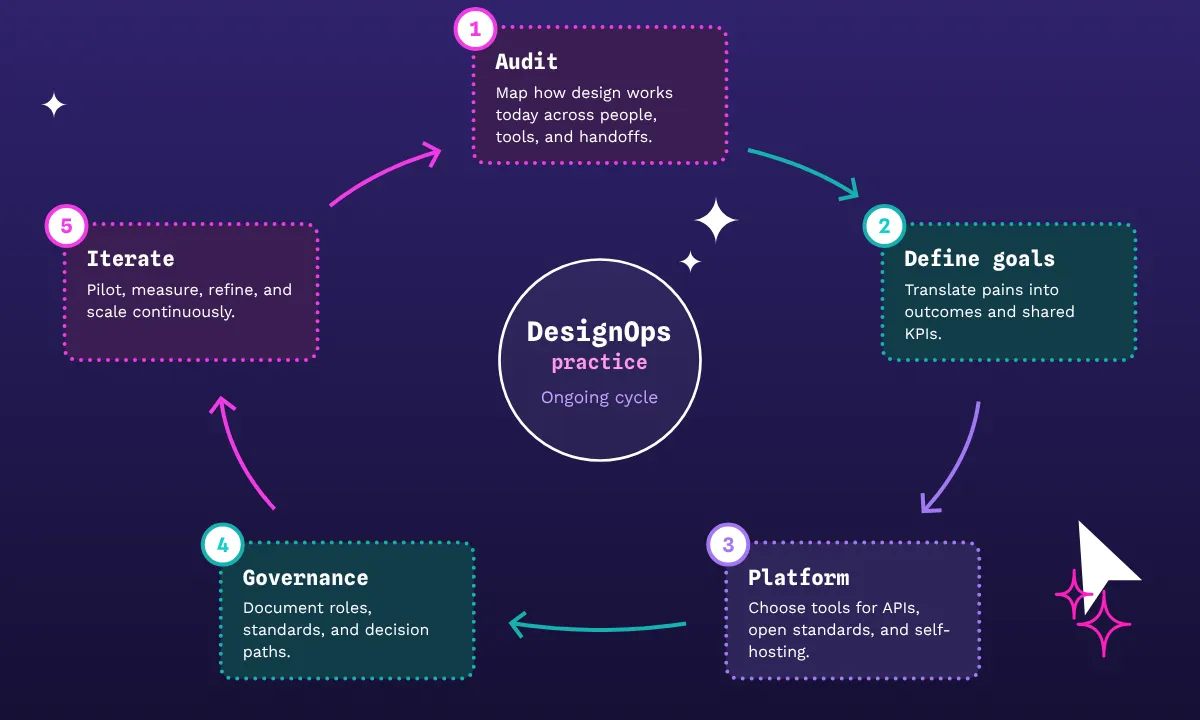
Moving from ad‑hoc efforts to a structured DesignOps practice requires you to treat it as a program with stages instead of a single tooling switch. Your experience will vary, but these steps can help you stay the course.
1. Audit your current state
Start by mapping how design at your company actually works today, not how you wish it worked. Trace a few recent projects from initial request to production, and document:
- Who was involved
- Which tools were used
- What artifacts were created
- Where work stalled or bounced back
Capture your tool landscape, including design, prototyping, research, documentation, and handoff. Do they connect? If not, why not?
At the same time, assess the state of your design system and related assets. Do you have a shared library? Are tokens or styles defined and used consistently? Can you tell which products are on which version of key components? This baseline will give you a concrete starting point and clear evidence when you improve things later.
2. Define your DesignOps goals
Next, translate pains into goals that matter beyond the design org. For example, instead of “better collaboration,” explore outcomes like reduced time from brief to implementation or higher satisfaction scores from partner teams. Prioritize these goals and decide what you’ll measure through common, shared KPIs.
It’s often helpful to separate quick wins from structural changes, such as:
- Quick wins: Better templates, clarified review expectations, or a unified documentation space
- Structural changes: Updated team structure, new design system investment, or re‑platforming
By uncoupling them, you avoid trying to fix everything at once and give stakeholders a story about how change will unfold. Start by prioritizing quick wins that relieve the most painful bottlenecks and build trust, then sequence structural changes with the capacity you realistically have to support them.
3. Choose the right platform architecture
With goals in place, revisit your tool and platform decisions through a DesignOps lens. Evaluate not just features, but architecture:
- Does the platform offer APIs to automate recurring tasks or integrate with your existing systems?
- Can you self‑host or choose where data lives if your security posture requires it?
- Does it use open standards so that your design assets can move, evolve, and integrate with implementation without brittle translation layers?
For many enterprises, the ideal pattern is a primary design platform that supports collaborative workflows and handoff, a robust design system implementation, and a handful of well‑chosen integrations. From there, you extend via APIs and standards rather than piling on more disconnected tools. The more your platform aligns with your desired operating model, the less energy you spend fighting it.
4. Establish governance and standards
Governance is where DesignOps becomes tangible. You’ll want to:
- Document how decisions are made about design systems, tooling, and process changes.
- Define roles like system owner, contributor, reviewer, and consumer.
- Create lightweight policies for how new patterns are proposed, reviewed, and, if accepted, rolled out across teams.
At the workflow level, codify standards for things like file structure, naming, accessibility checks, and handoff expectations. The key is to make these standards discoverable and supported by your tools through templates, shared libraries, and automation, so it’s easier to comply than not.
5. Implement and iterate
Finally, approach implementation as a series of experiments rather than a grand launch. Pilot new workflows or tooling with a few teams that represent different contexts (such as a core product squad or a more regulated domain). Give them support, collect feedback, and track the metrics you defined earlier.
Use what you learn to refine your approach before rolling it out more broadly. As you scale changes, keep communication tight by explaining the “why” and offering examples. Just be sure to celebrate your wins, too, because DesignOps maturity isn’t a finish line. It’s more of an ongoing cycle of measuring, adjusting, and improving as your organization and products evolve.
How modern platforms support enterprise DesignOps
Modern design platforms are about more than a place to add colored pixels and fonts. The right one for your organization can also serve as an operational hub from which your product development flows.
For DesignOps leaders, the most important capabilities focus on integration, deployment control, interoperability, systematic consistency, and collaboration. API‑first platforms also connect design work to issue trackers, CI/CD pipelines, and design system tooling without manual exports.
For those in sensitive industries or with unique data needs, self‑hosting options offer additional control over data, performance, and compliance, and avoid the cloud infrastructure entirely. Support for open web standards (CSS‑aligned layout, SVG, design tokens) ensures work stays in a format that both designers and developers can use, add to, and maintain with consistency around a single source of truth across tools.
Scale your design operations with Penpot
Perhaps you’ve mapped your current state, set your DesignOps goals, and realized that your platform is a bottleneck. Your next move is to shift to tools that align with the operating model you’re trying to build. Penpot’s DNA encompasses the principles of openness, flexibility, and enterprise‑grade control — a must for successful DesignOps.
You can self‑host Penpot on your own infrastructure or use the cloud offering, as it gives you options to meet security and compliance requirements without sacrificing collaboration. Penpot’s open‑web foundation and support for standards‑based outputs reduce the friction found in designer-developer handoffs. It also avoids vendor lock‑in. With APIs and design tokens for customizable integration points, you can automate the workflows you want at scale at any time.
The right DesignOps strategy can be the difference between constantly fighting your tools and having a platform that grows with you instead of against you. Ready to upgrade your tool experience? Sign up for a Penpot account today or speak with our team about what our enterprise-level plans can offer you.