Vendor lock-in: What it is, why it matters, and how to avoid it
Vendor lock-in traps your design files in proprietary formats. Learn what it is, why it matters for design teams, and how to avoid it with open standards.

Imagine you’re the head of a team, and you’ve just been informed that your design platform — the one with all your design system components and prototypes — is being sunset. You have just a few months to move everything or lose it, and the file types “as is” are incompatible with any other design tool. With your logo files, design systems, and app flows locked in one proprietary platform, your options are limited.
This is a classic example of vendor lock-in, a common state of SaaS tools that affects more than just the design team. While it can be prevented, you need some advanced planning to ensure that the tools you choose now allow you to shift paths tomorrow without incurring additional costs or skills gaps.
So, what can you do to avoid vendor lock-in? We address this not-so-small wrinkle that occurs with many popular design software options. Use this information to empower your teams to create without the restrictions of switching costs, IP risks, or compliance barriers.
What is vendor lock-in?
Vendor lock-in happens when switching tools becomes so difficult, costly, or risky that your team effectively loses the freedom to choose what’s best. It creates an unhealthy dependence on a single software, service, or hardware provider. You technically may be able to move away from the tool, but the cost or disruption to your business makes it simply easier to stay put.
In SaaS and design tooling, dependencies may arise for a number of reasons, which we list below. They all result in an inflexible situation in which you are forced into the vendor’s roadmap and business model, rather than your own.
Here are a few examples:
- Technical lock-in: Proprietary file formats, APIs, and workflows that can’t be exported or copied to other tools
- Contractual lock-in: Long-term agreements, penalties for early termination, or pricing structures that make exit too costly to pursue
- Data lock-in: Not being able to easily extract your information in a complete, usable way
- Knowledge lock-in: Inability to separate your team’s skills, habits, and documentation from the vendor tool
Any of these lock-in dynamics chip away at your control over your team’s ability to maintain and scale your design system and can discourage you from pursuing what’s best for your business. You may hesitate to make changes because of potential costs or resources to migrate and retrain. For example, you might avoid experimenting with newer, better-suited tools because the migration effort outweighs the potential benefits. Over time, what starts as a small gap widens as your tool stagnates while alternatives innovate.
The real risks of vendor lock-in for design teams
Vendor lock-in can trap years of creative work in formats and platforms you don’t control. It’s especially difficult when you trust a software vendor with all your proprietary files, as you can’t just pull the plug if you don’t like the direction the vendor chooses to go. You either have to play along or go through a messy digital divorce to get your files back intact.
A clear example of this is when Adobe stopped actively investing in Adobe XD and moved it into “maintenance mode,” with no new feature development. The product was discontinued as a standalone purchase in 2023, so designers with large libraries of files, assets, and client work in XD had to plan file migrations under time pressure. It left many to either move to other Adobe products with similar formats and workflows or rebuild in a new tool entirely.
Product discontinuations like the Adobe situation are just one possible scenario. When locked into a single vendor, pricing changes also land differently. In a competitive, portable environment, you can respond to a steep price increase by shopping around. A locked-in environment leaves you to agree to the new price (even if it doesn’t fit your budget) or migrate to a new system, which also comes with costs.
There is also the question of control over creative IP. When your files only exist inside a vendor’s proprietary cloud, you’re limited in how you back up, mirror, or audit them. Regulated industries become especially vulnerable to how they can handle data residency, retention, and access if they do decide to migrate.
Finally, if you decide a new software is your best option, the hidden cost can go far beyond the monthly subscription or contract fee. You could end up rewriting design systems or rebuilding interaction patterns that don’t carry over. In the end, the license price may be small compared to any opportunity costs and project delays.
Warning signs you’re headed for vendor lock-in
If file formats, pricing, and infrastructure have you dependent on a tool, you’re already dealing with vendor lock-in. It rarely happens in a single, dramatic event. Instead, vendor lock-in accumulates through small decisions that seem convenient in the moment.
A few early warning signs to watch for include:
- Proprietary file formats with no standard export options: Design work that cannot be exported to open formats (like SVG, PNG, or CSS-based assets) in a structured, loss-aware way
- No self-hosting or data portability options: A vendor that only offers multi-tenant SaaS with limited backup and export capabilities
- Rapid feature deprecation or forced migrations: A pattern of retiring features quickly, pushing users into new workflows, or consolidating products without long-term support
- Pricing model changes that penalize growth: Usage-based pricing that escalates sharply as you add collaborators, projects, or environments
- Lack of API access for integration and automation: Limited or closed APIs, opaque rate limits, or “view-only” integration approaches
- No clear data export or exit strategy: Contract, documentation, or support channels without a straightforward path for exporting all your content in usable formats
Ask yourself, “What would it take us to move away from this tool in 12 months?” If this question is too difficult to answer, vendor lock-in is likely at play.
How to avoid vendor lock-in
When looking for a design platform, choose commitments that keep your options open. Look for clear data ownership terms, open standards, and the ability to take your files with you — without limitations. Then, you can change direction without rebuilding everything from scratch.
Prioritize open standards and data portability
Look for tools that support open file formats like SVG and open web technologies like CSS. These act as safeguards because they follow public standards rather than a single company’s private rules. When you create in these open file formats, you can import into and export from any number of tools and platforms.
For example, SVG is a widely used W3C standard that scales without quality loss, works in many tools, and stays usable as long as browsers and design apps support it.
Data portability should also be non‑negotiable, so you have no parameters on how you use the work you create from a design tool. Work only with tools that support seamless exporting of projects, components, and assets in formats that other tools can use. Platforms that don’t allow this essentially force you to rebuild everything by hand to maintain quality or file integrity. (Bulk export and import are always better than one file at a time.)
Questions to ask the vendor include:
- What formats can we export individual files and entire libraries to?
- Can we export in bulk via an API or CLI, not just one file at a time?
- Will exported assets preserve structure (layers, components, variables), or just flattened images?
- How long will our data remain accessible after we terminate a contract?
- Do we retain perpetual rights to use exported assets after contract termination?
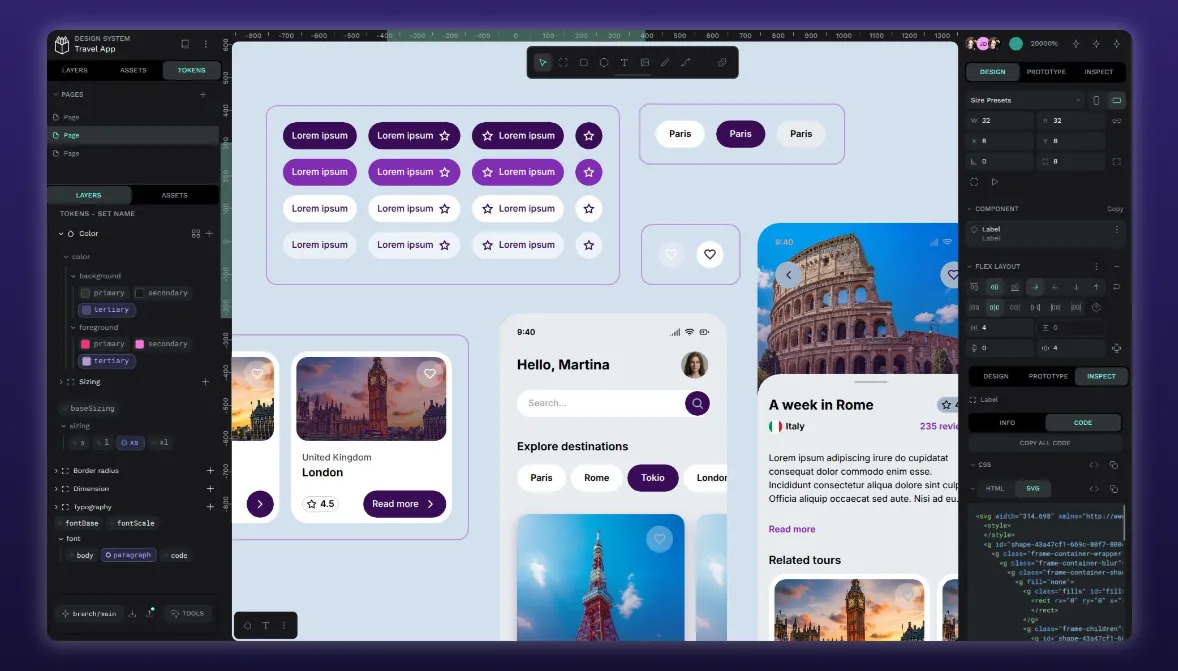
When your design tool produces CSS-based layouts, SVG icons, and semantic tokens, your work is easier to reuse across systems.
Choose open-source and community-driven platforms
These types of platforms give you long-term leverage because the product’s future is shared with users, not dictated by a single vendor. While open source doesn’t automatically eliminate risk, it changes the power balance. Even if the original maintainer changes focus, a healthy community can continue maintaining and evolving the tool as needed.
Community governance and transparent development processes provide an additional safeguard. You won’t have to wait for a quarterly release note and can see progress in real time. When necessary, you may even contribute fixes or fund specific improvements. Roadmaps, issue trackers, and public discussions let you see how design decisions are made and how quickly the vendor addresses bugs and feature requests.
Over time, open platforms tend to evolve in response to user needs rather than purely for-profit reasons. The user feedback loop makes it more likely that critical capabilities remain first-class priorities. You can identify an open-source platform by checking whether its actual source code is publicly available and governed by a recognized open-source license. If there’s no public repo and no clear open-source license, it’s not truly open source.

Look for API access and self-hosting options
Both of these features support deep integration and compliance requirements while giving you the option to move on when you want. Well-documented APIs, in particular, are a strong signal that a platform is designed to participate in a larger ecosystem rather than trap you in its own. APIs support automated workflows, CI/CD pipeline integration, and design system syncing. You can eventually build custom tooling that reflects how your teams actually work.
Self-hosting takes autonomy a step further by letting you run the platform on your own infrastructure. Choose on-premises, in your private cloud, or in a tightly controlled environment that meets your compliance and latency needs. Then, you always have governance over deployment, storage, and backups without waiting on the vendor’s SaaS update schedule.
Avoid vendor lock-in with Penpot
Penpot is built on open web standards. Its native file format is SVG, and it uses web technologies like CSS Grid and Flex Layout to represent designs, or JSON formats in Design Tokens. When you use it, you can take your design files anywhere. They're readable by browsers, editable in code editors, and compatible with any tool that supports standard SVG.
Because the platform itself is open source and supported by an active global community, Penpot stays transparent and responsive. The codebase is available for audit, extension, and customization, so it’s never a black box. Users adopt a tool whose evolution they can see and influence, instead of one dictated solely by shareholder priorities.
Most importantly, Penpot avoids the classic lock‑in traps: no proprietary file formats, no surprise product sunsets, and no dependency on a single vendor cloud to access your designs. Your files remain your files, stored in open formats, accessible on your terms, and resilient to business decisions outside your influence.
Take ownership of your design workflow and de-risk your tool choices. Talk to our team to explore how Penpot can give your organization more control, flexibility, and ownership over its design infrastructure.
Related blogs
If you found this article interesting you might like these ones too:
 Paula Tienza
 Juan de la Cruz García