
Practical uses for math functions in design tokens
Penpot design tokens support both basic calculations and complex math functions. Let’s explore how you can use both to level up your design systems.


I did not get into design to do math. In fact, I find math pretty intimidating. But simple calculations like addition, subtraction and multiplication are useful every time I’m designing a layout. Splitting a design into three columns uses division. I use multiplication when calculating a heading’s top margin that needs to be twice its bottom margin to help group it visually with the content that follows.
Sometimes we’ll do these calculations in our heads and manually input them, but sometimes it’s useful to store them as reusable values that you can use consistently across your design. That’s where design tokens come in. You can use the same spacing.xs token for every bottom padding throughout your design. And you can do calculations inside your design tokens like 5 * 2.
Simple calculations in design tokens
Calculations are particularly useful when combined with references to other tokens, because you can build your token system around formulas that hold up regardless of the values you enter.
For example, you store your base font size value of 16 as a font-size.base token. Then for your typographic hierarchy you multiply your font sizes by your chosen scale of 1.2:
{font-size.base} * {scale}I have a few tips for doing basic calculations in design tokens in Penpot:
- Reference other tokens in token values using curly braces like
{token.name}. - Use the
numbertoken type for your calculations. That way you can be sure you’re using a value that can be calculated. Then you can reference the resulting value in any other token type that accepts numbers. - You can combine hard-coded values with token references like
{spacing.base} * 1.5so you don’t have to tokenize unique values (and create unnecessary token bloat). - You can write simple equations with or without brackets. For example,
8 * 8and(8 * 8)both resolve to64.
Math functions in design tokens
But Penpot design tokens supports more than just simple calculations, there are functions to help you do way more complicated math. :mind-blown-emoji: Some of these functions are more practical for day-to-day design tokens than others. Let’s check out some of the most useful ones. I’ve added each example in the design tokens JSON format that you can import into Penpot from the design tokens panel. Or you can download the demo Penpot file from the Penpot Hub to play with these examples:
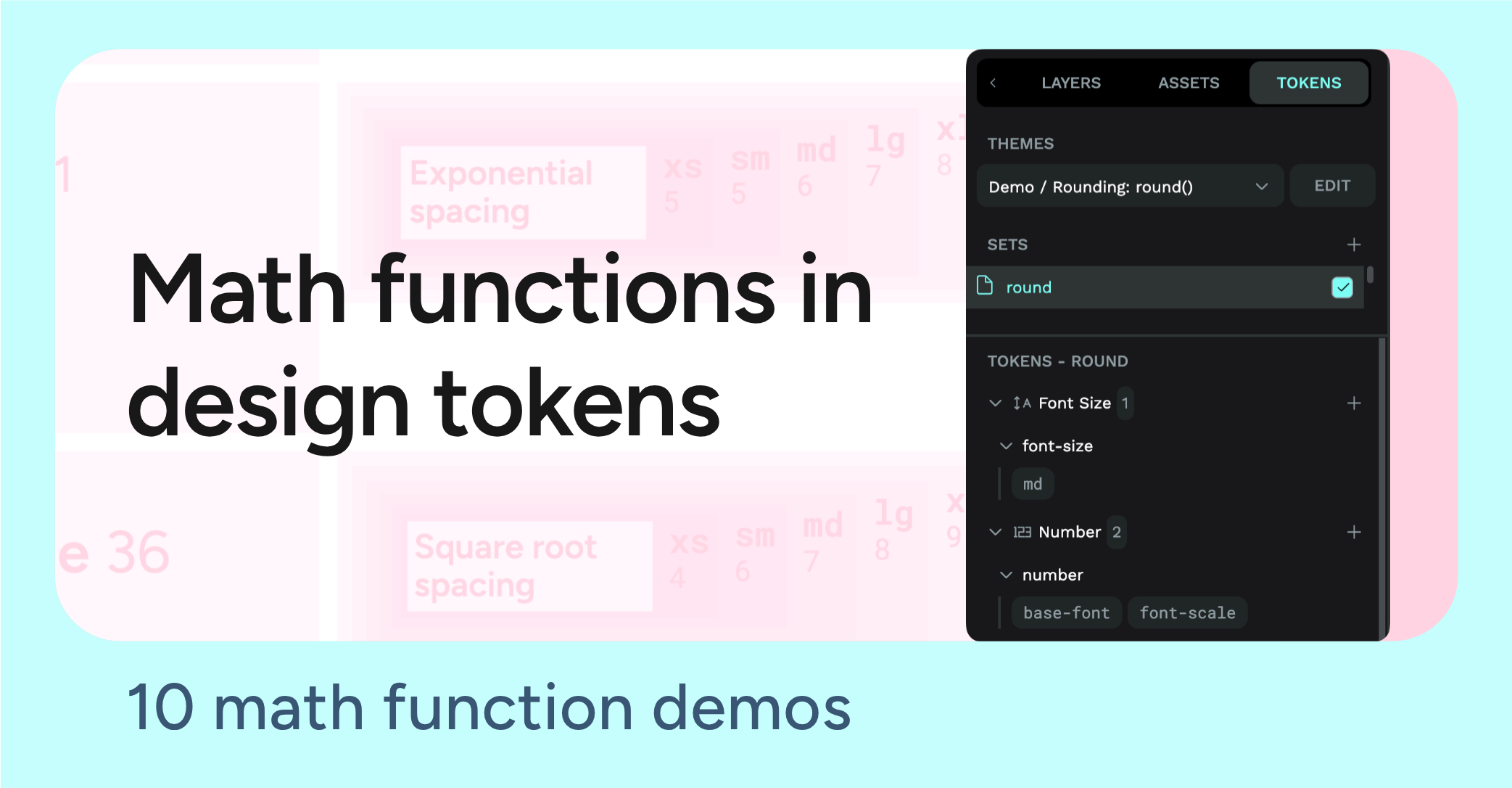
Round design token values for better rendering and alignment
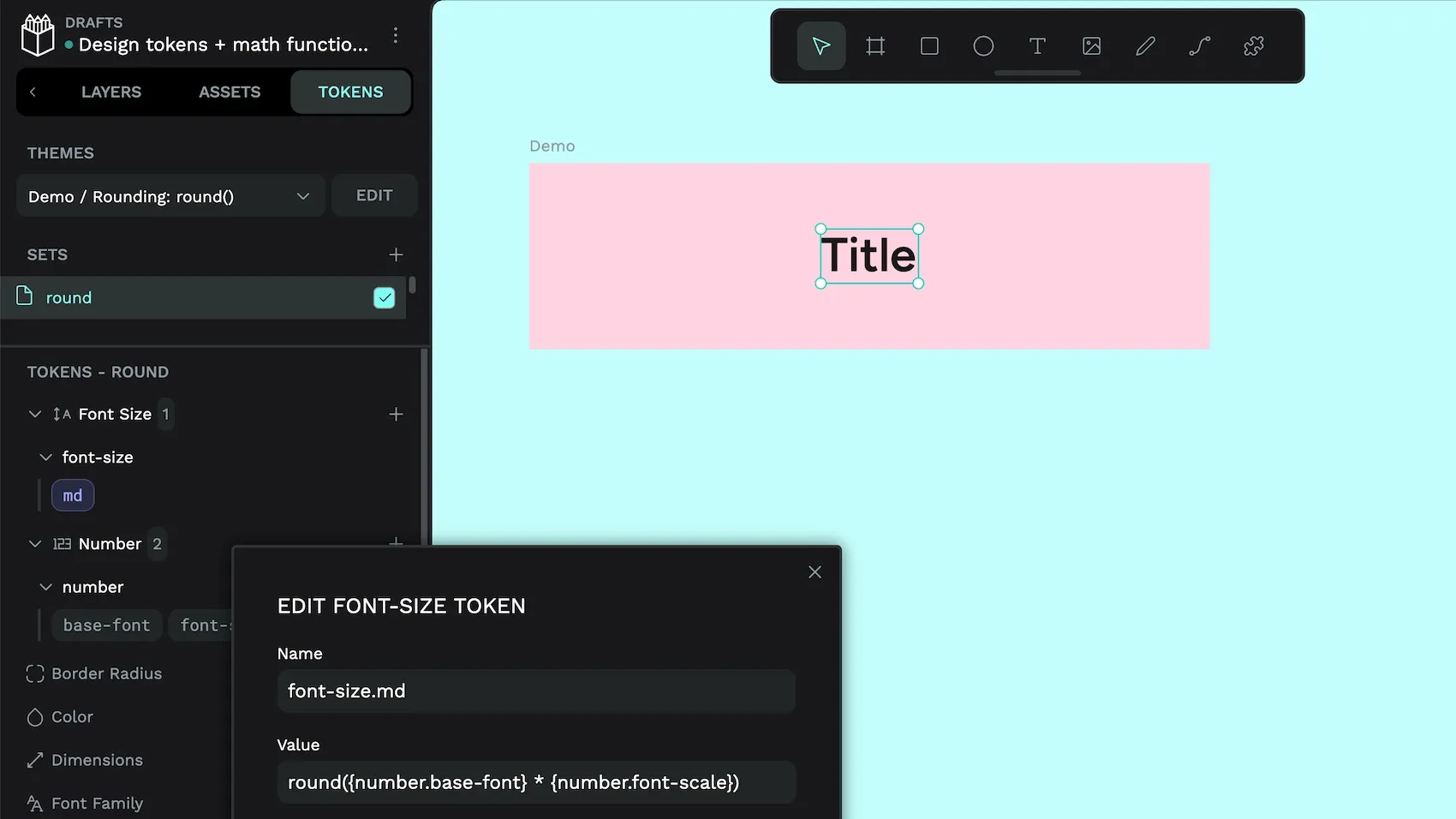
You might have noticed in my previous blog post about proportional typographic scales that a type scale (or spacing scale) built on a fractional multiplier tends to produce decimals. You can round your values to the nearest whole number, so they render crisply at whole pixel boundaries.
In this example, we use round(x) to round the result of a perfect fourth type scale step to the nearest pixel:
{
  "round": {
    "number": {
      "base-font": {
        "$value": "16",
        "$type": "number",
        "$description": "Number token, base font size"
      },
      "font-scale": {
        "$value": "1.333",
        "$type": "number",
        "$description": "Number token, perfect fourth scale ratio"
      }
    },
    "font-size": {
      "md": {
        "$value": "round({number.base-font} * {number.font-scale})",
        "$type": "fontSizes",
        "$description": "Font size token, round(16 × 1.333) = round(21.328) = 21"
      }
    }
  }
}
Confused by the format? Read this tutorial on design tokens JSON.
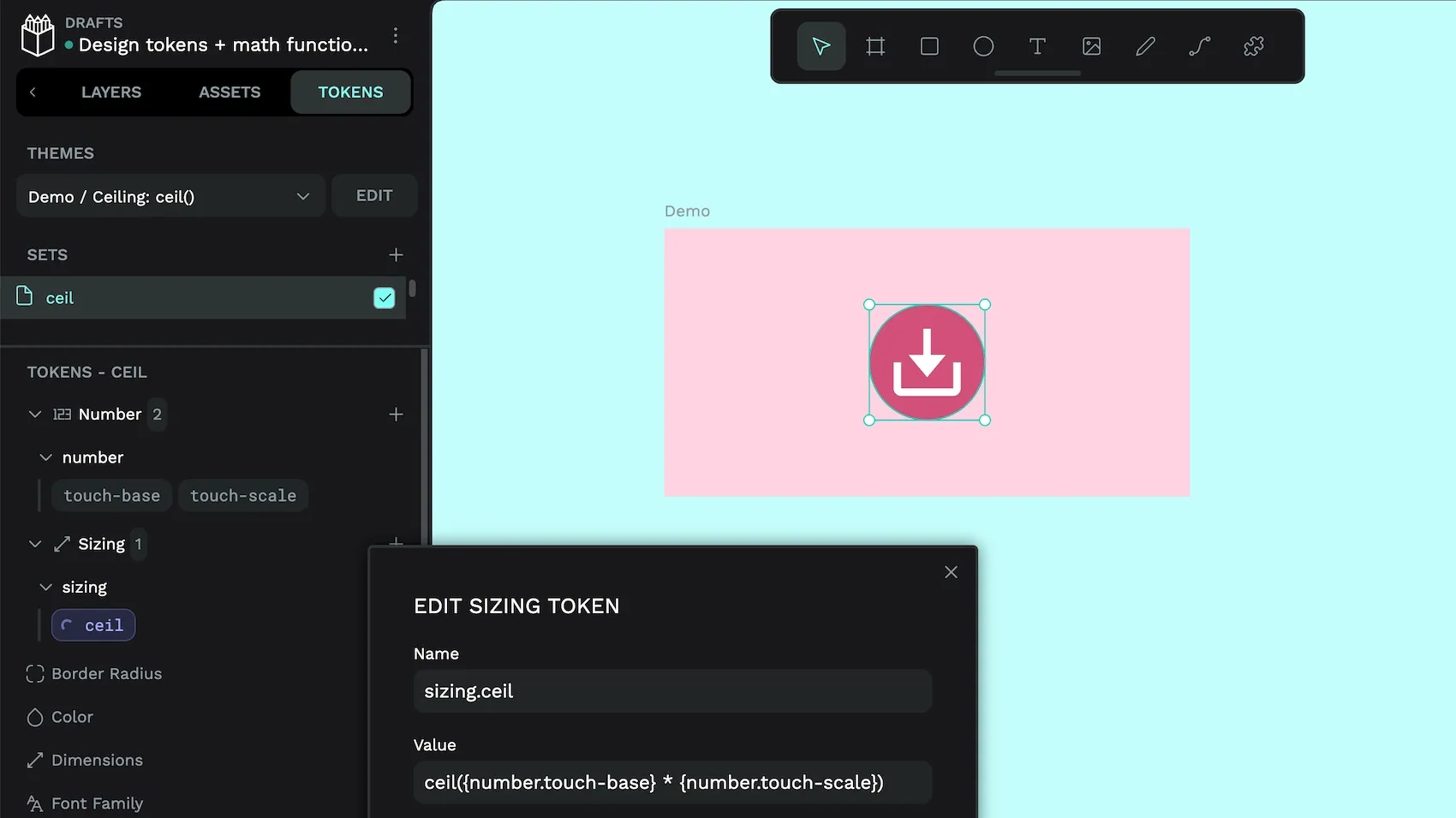
The ceil(x) function is similar, but always rounds up. This is useful when a value must never fall below a threshold such as a minimum touch target size:
"ceil": {
  "number": {
    "touch-base": {
      "$value": "40",
      "$type": "number",
      "$description": ""
    },
    "touch-scale": {
      "$value": "1.08",
      "$type": "number",
      "$description": ""
    }
  },
  "sizing": {
    "ceil": {
      "$value": "ceil({number.touch-base} * {number.touch-scale})",
      "$type": "sizing",
      "$description": "ceil(40 × 1.08) = ceil(43.2) = 44. A touch target that never dips below 44px."
    }
  }
}
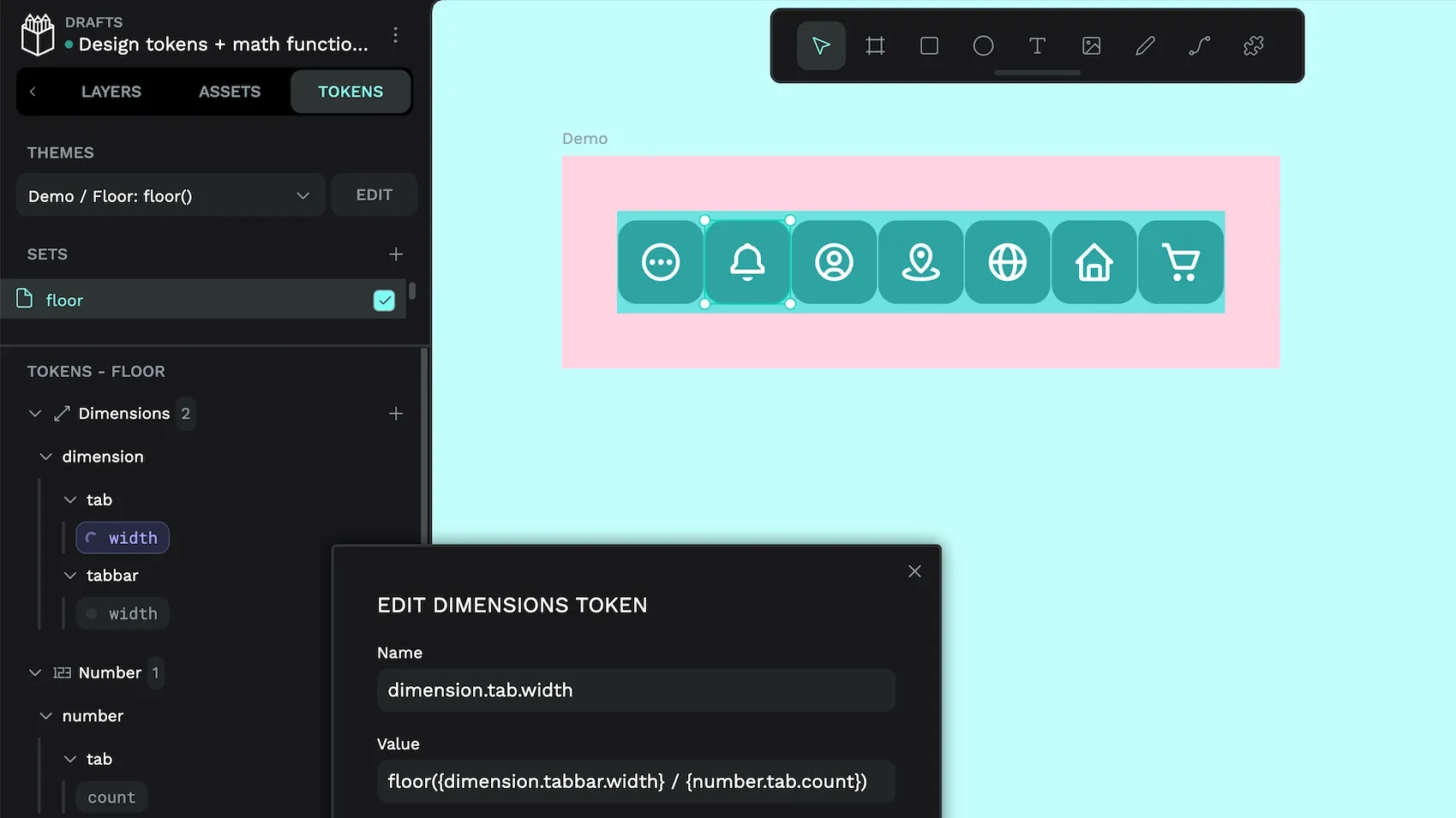
The floor(x) function works the other way: it always rounds down. This is handy when a value must never exceed a boundary, like an app tab navigation width:
"floor": {
  "number": {
    "tab": {
      "count": {
        "$value": "7",
        "$type": "number",
        "$description": ""
      }
    }
  },
  "dimension": {
    "tabbar": {
      "width": {
        "$value": "320",
        "$type": "dimension",
        "$description": ""
      }
    },
    "tab": {
      "width": {
        "$value": "floor({dimension.tabbar.width} / {number.tab.count})",
        "$type": "dimension",
        "$description": "floor(320 / 7) = floor(45.71) = 45. A tab width that stays inside the tab bar boundary and never causes overflow."
      }
    }
  }
}
Prevent negative design token values with absolute values
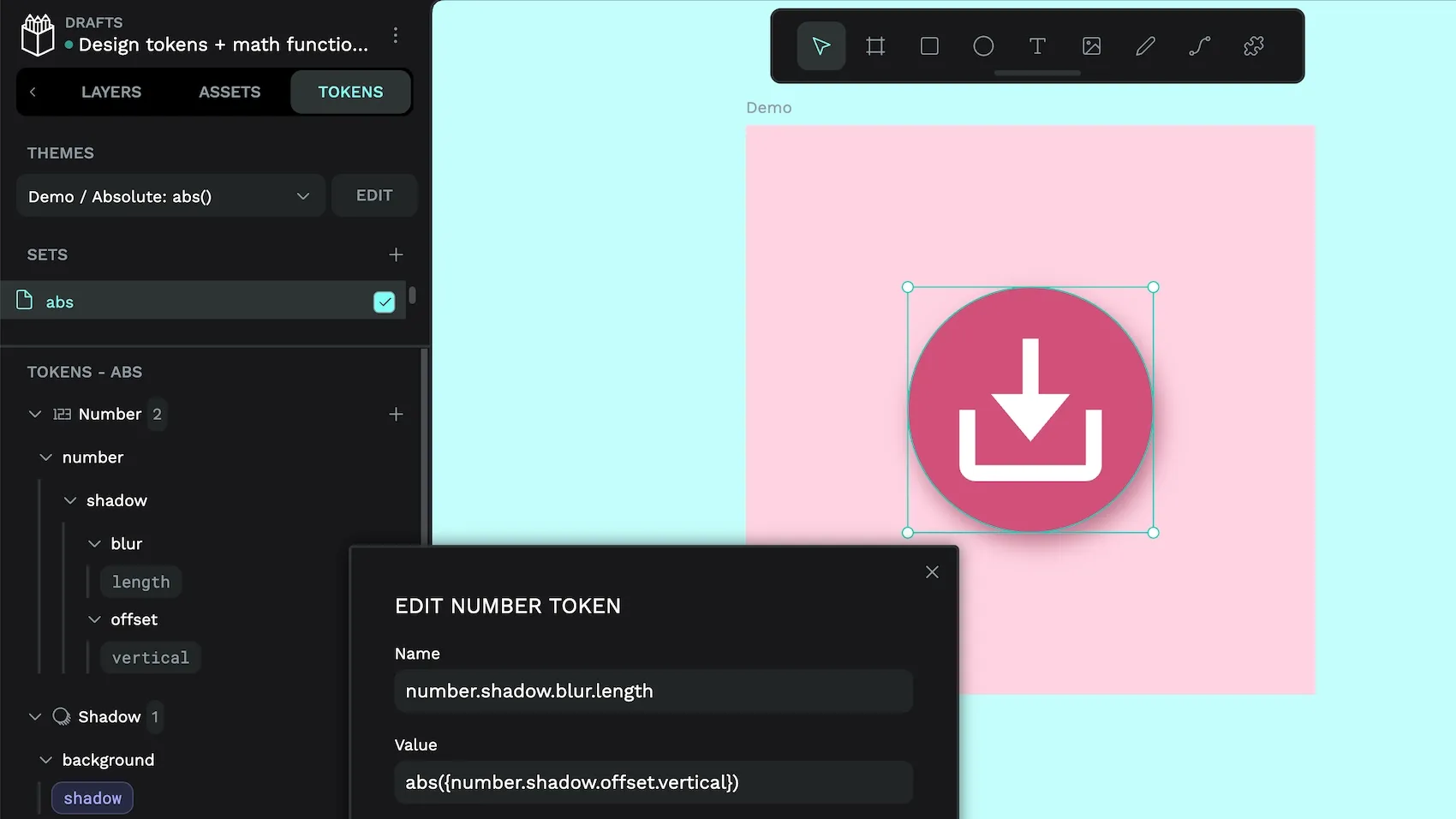
Your tokens might reference a value that is positive in one direction and negative in another. (Think creating shadows.) The abs() function converts your value into a positive number before it reaches properties like padding, blur radius, or stroke width that don’t accept negative values.
You’ll probably create calculations that make negative values impossible for these properties, but in the case you are doing some wild calculations and need the security of always having a positive value, you could use abs() like this:
"abs": {
  "number": {
    "shadow": {
      "offset": {
        "vertical": {
          "$value": "-4",
          "$type": "number",
          "$description": "Number token, for shadow offset. Positive = down, negative = up"
        }
      },
      "blur": {
        "length": {
          "$value": "abs({number.shadow.offset.vertical})",
          "$type": "number",
          "$description": "Number token for blur length, abs(-4) = 4. Converts shadow offset to a safe, always-positive spacing or blur value."
        }
      }
    }
  },
  "background": {
    "shadow": {
      "$value": [
        {
          "offsetX": "1",
          "offsetY": "2",
          "blur": "{number.shadow.blur.length}",
          "spread": "0",
          "color": "{color.background.shadow}",
          "inset": false
        }
      ],
      "$type": "shadow",
      "$description": "Composite shadow token"
    }
  }
}
Using minimum and maximum token values to constrain responsive design
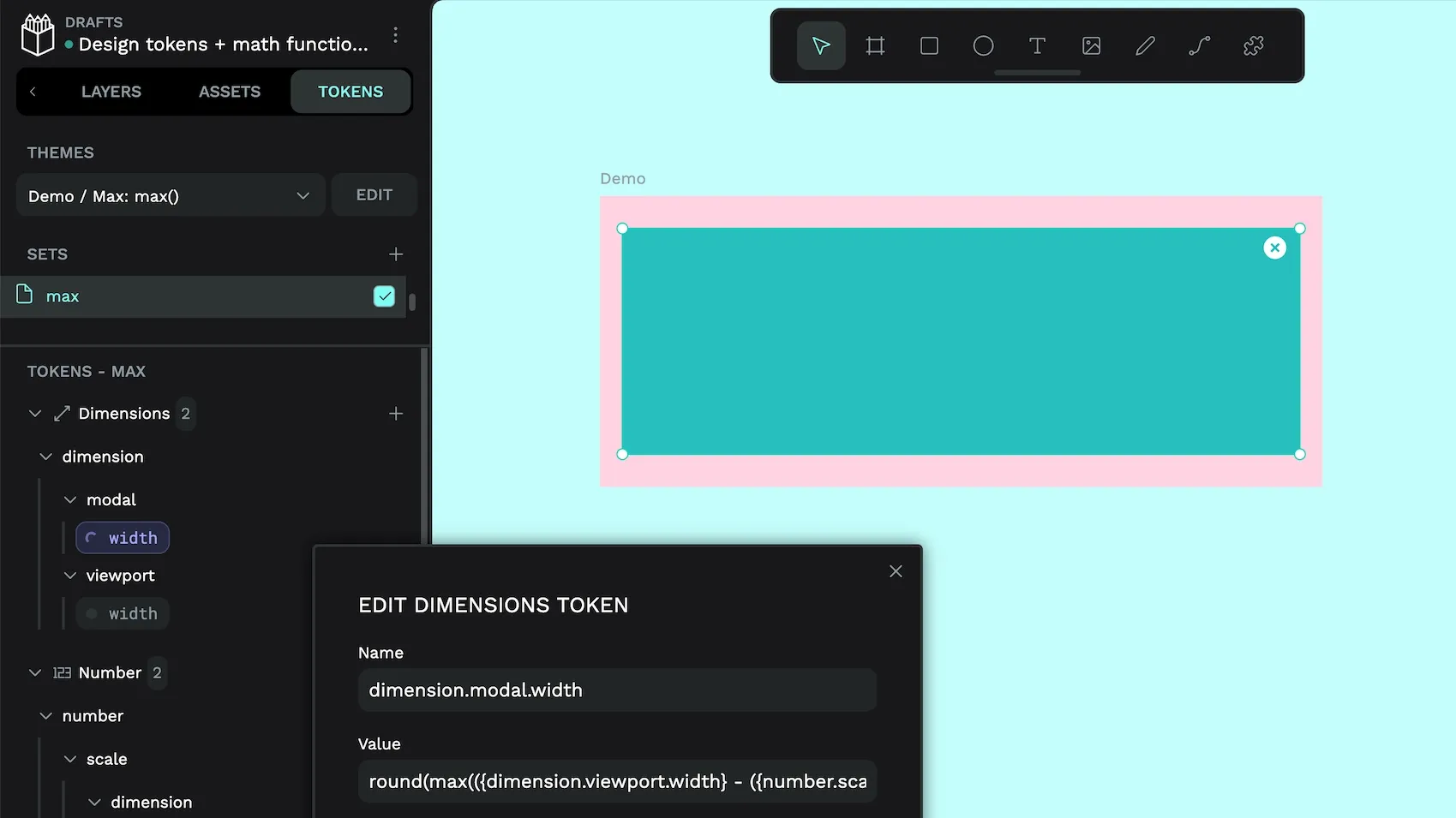
When you’re working with fluid layouts and typography, you can end up calculating values from ratios that drift outside acceptable ranges at extreme viewport sizes. How big is too big for a headline title on a massive display? Mobile viewports shouldn’t mean unreadably small! The max() function chooses from the largest value in the list so if you’re providing a token reference (or multiple token references), it picks the most appropriate value.
In this example, we use the function to ensure the width of our modal fits the available space, choosing from the maximum of the values:
- The viewport width (currently set to
640px) minus the padding (2*30). 300px.- The medium dimension scale value of
600px.
Using max(x, y, …) returns the largest of the provided values (x, y and so on).
"max": {
  "dimension": {
    "viewport": {
      "width": {
        "$value": "640",
        "$type": "dimension",
        "$description": "Dimension token, Current viewport or container width in px"
      }
    },
    "modal": {
      "width": {
        "$value": "round(max(({dimension.viewport.width} - ({number.scale.spacing.xl} *2)), {number.scale.dimension.xl}, 200))",
        "$type": "dimension",
        "$description": "Dimension token, round(max((640 - (60), 600, 200)) = round(max(580, 600, 200)) = 600"
      }
    }
  },
  "number": {
    "scale": {
      "dimension": {
        "xl": {
          "$value": "600",
          "$type": "number",
          "$description": "Number token, the XL step in the dimension scale."
        }
      },
      "spacing": {
        "xl": {
          "$value": "30",
          "$type": "number",
          "$description": "Number token, the XL step in the spacing scale."
        }
      }
    }
  }
}
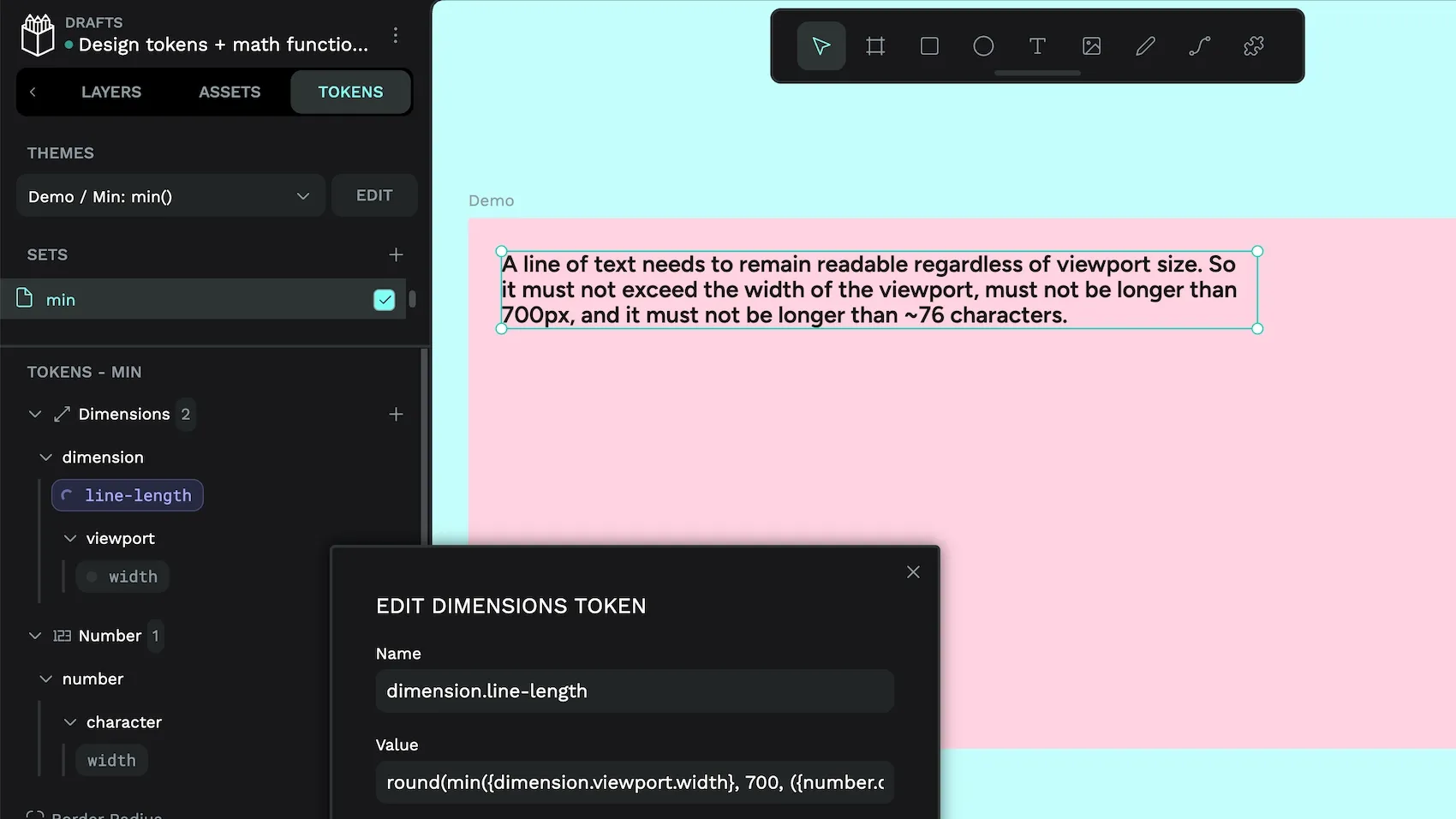
The min() function does the opposite, choosing from the smallest number in the list. Here’s an example where you want to return the smallest value for text width from:
- The viewport width (currently set to
1024px). 700px.- ~
76characters.
Using min(x, y, …) returns the smallest of the provided values (x, y and so on):
"min": {
  "number": {
    "character": {
      "width": {
        "$value": "round(9.07)",
        "$type": "number",
        "$description": "The average width of one character in the current font. round(9.07) = 9"
      }
    }
  },
  "dimension": {
    "viewport": {
      "width": {
        "$value": "1024",
        "$type": "dimension",
        "$description": "Dimension token, Current viewport or container width in px"
      }
    },
    "line-length": {
      "$value": "round(min({dimension.viewport.width}, 700, ({number.character.width} * 76)))",
      "$type": "dimension",
      "$description": "Dimension token, round(min(1024, 700, (9 * 76))) = round(min (1024, 700, 684) = 684"
    }
  }
}
Create harmonious scales with the power, exponential, square root, and logarithmic functions
Using a linear scale for your font sizes or spacing, like 8, 16, 24, 32, can feel mechanical. You can use the pow(), exp(), sqrt() and log() functions to create scales that feel more natural. In all of these examples, I’ve tweaked the multiplier values for a consistent medium (md) size across each example, so you can see how the scales vary across their smaller and larger steps.
We start off with a default base font size and base spacing size. Both are number type tokens, so you can use them directly in function calculations:
"number": {
  "base-font": {
    "$value": "16",
    "$type": "number",
    "$description": "Number token, Base font size for all functions."
  },
  "base-spacing": {
    "$value": "4",
    "$type": "number",
    "$description": "Number token, Base spacing size for all functions."
  }
}
Then we add in our scale steps. This is so we have an easily-updatable shorthand for xs, xl, and so on:
"number": {
  "step": {
    "sm": {
      "$value": "2",
      "$type": "number",
      "$description": "Second step in the scale. The second smallest size."
    },
    "xs": {
      "$value": "1",
      "$type": "number",
      "$description": "First and lowest step in the scale. The smallest size."
    },
    "3xl": {
      "$value": "7",
      "$type": "number",
      "$description": "Highest step in the scale. The largest size."
    },
    "lg": {
      "$value": "4",
      "$type": "number",
      "$description": "Fourth step in the scale. The fourth largest size."
    },
    "2xl": {
      "$value": "6",
      "$type": "number",
      "$description": "Sixth step in the scale. The second largest size."
    },
    "md": {
      "$value": "3",
      "$type": "number",
      "$description": "Third step in the scale. The third smallest size."
    },
    "xl": {
      "$value": "5",
      "$type": "number",
      "$description": "Fifth step in the scale. The third largest size."
    }
  }
}
Then comes our function calculations and their multipliers.
pow(): The power function creates consistent proportional exponential jumps in your scale, with each step being multiplied by the multiplier ratio. Changing this ratio will change how dramatic the steps are in your scale. Don’t confuse the pow() function with the exp() function!
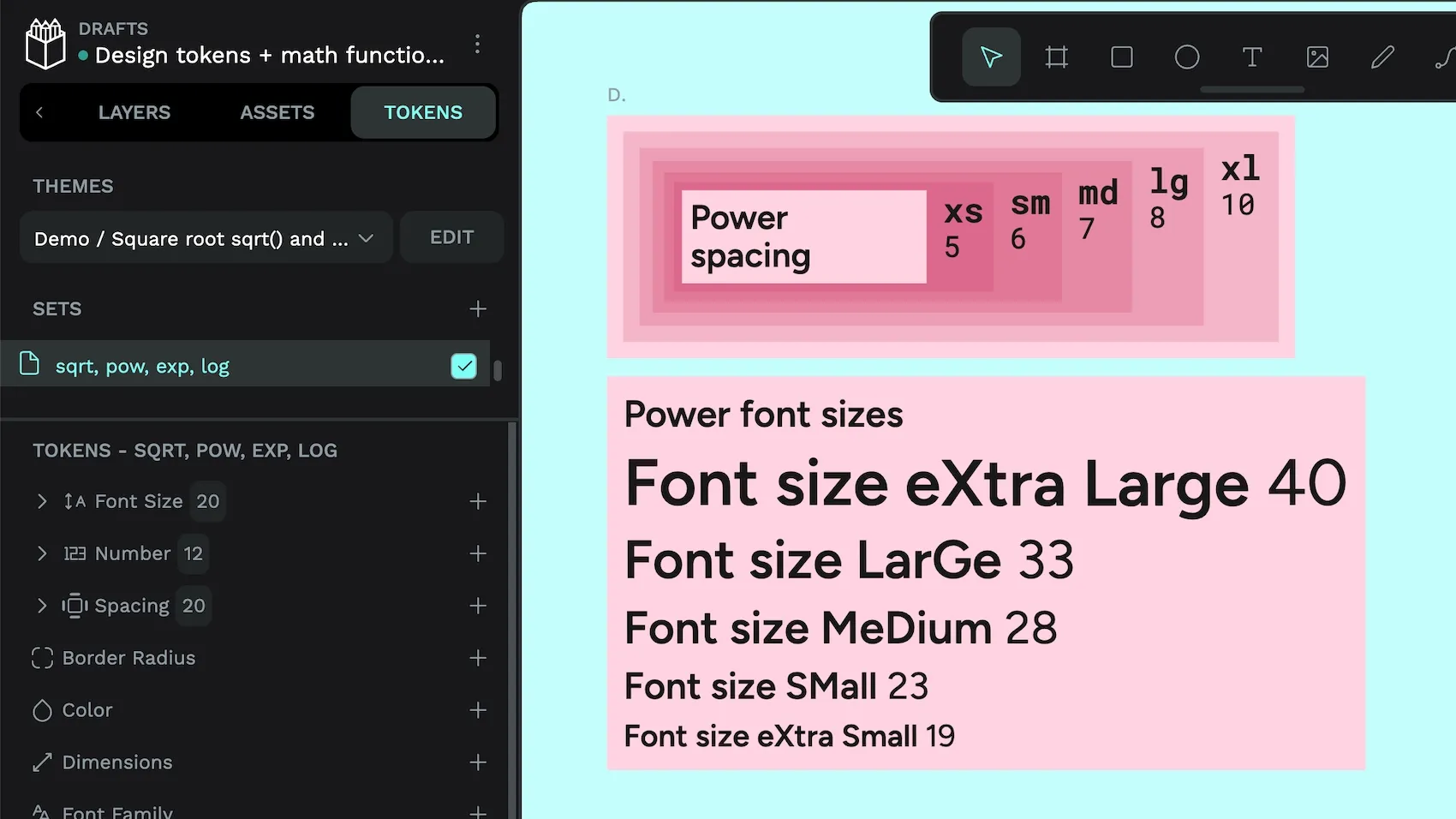
pow(): Consistent jumps between steps, proportion created with a fixed multiplier ratio."number": {
"scale": {
"multiplier": {
"pow": {
"$value": "1.2",
"$type": "number",
"$description": "Number token, tweaked to normalize values produced by pow()"
}
}
}
}
"font-size": {
"pow": {
"xs": {
"$value": "round({number.base-font} * pow({number.scale.multiplier.pow}, {number.scale.step.xs}))",
"$type": "fontSizes",
"$description": "round(16 * pow(1.2, 1)) = round(16 * 1.2) = round(19.2) = 19"
},
"sm": {
"$value": "round({number.base-font} * pow({number.scale.multiplier.pow}, {number.scale.step.sm}))",
"$type": "fontSizes",
"$description": "round(16 * pow(1.2, 2)) = round(16 * 1.44) = round(23.04) = 23"
},
"md": {
"$value": "round({number.base-font} * pow({number.scale.multiplier.pow}, {number.scale.step.md}))",
"$type": "fontSizes",
"$description": "round(16 * pow(1.2, 3)) = round(16 * 1.728) = round(27.648) = 28"
},
"lg": {
"$value": "round({number.base-font} * pow({number.scale.multiplier.pow}, {number.scale.step.lg}))",
"$type": "fontSizes",
"$description": "round(16 * pow(1.2, 4)) = round(16 * 2.0736) = round(33.1776) = 33"
},
"xl": {
"$value": "round({number.base-font} * pow({number.scale.multiplier.pow}, {number.scale.step.xl}))",
"$type": "fontSizes",
"$description": "round(16 * pow(1.2, 5)) = round(16 * 2.4883) = round(39.8128) = 40"
}
}
},
"spacing": {
"pow": {
"xs": {
"$value": "round({number.base-spacing} * pow({number.scale.multiplier.pow}, {number.scale.step.xs}))",
"$type": "spacing",
"$description": "round(4 * pow(1.2, 1)) = round(4 * 1.2) = round(4.8) = 5"
},
"sm": {
"$value": "round({number.base-spacing} * pow({number.scale.multiplier.pow}, {number.scale.step.sm}))",
"$type": "spacing",
"$description": "round(4 * pow(1.2, 2)) = round(4 * 1.44) = round(5.76) = 6"
},
"md": {
"$value": "round({number.base-spacing} * pow({number.scale.multiplier.pow}, {number.scale.step.md}))",
"$type": "spacing",
"$description": "round(4 * pow(1.2, 3)) = round(4 * 1.728) = round(6.912) = 7"
},
"lg": {
"$value": "round({number.base-spacing} * pow({number.scale.multiplier.pow}, {number.scale.step.lg}))",
"$type": "spacing",
"$description": "round(4 * pow(1.2, 4)) = round(4 * 2.0736) = round(8.2944) = 8"
},
"xl": {
"$value": "round({number.base-spacing} * pow({number.scale.multiplier.pow}, {number.scale.step.xl}))",
"$type": "spacing",
"$description": "round(4 * pow(1.2, 5)) = round(4 * 2.4883) = round(9.9532) = 10"
}
}
}This is a much more efficient way to create a typographic hierarchy compared to the example in my previous blog post about proportional typographic scales!
Avoid using values of less than 0 for your multiplier with pow() unless you want your scale to go in the opposite direction. This wouldn’t work for font size hierarchies, as your extra small and small values would be larger than your extra large and large values!
exp(): The exponential function creates a much more dramatic scale overall. The smaller steps have a subtle difference, but the differences get more extreme as you move to larger steps. Using a small multiplier helps keep font sizes within a usable range.
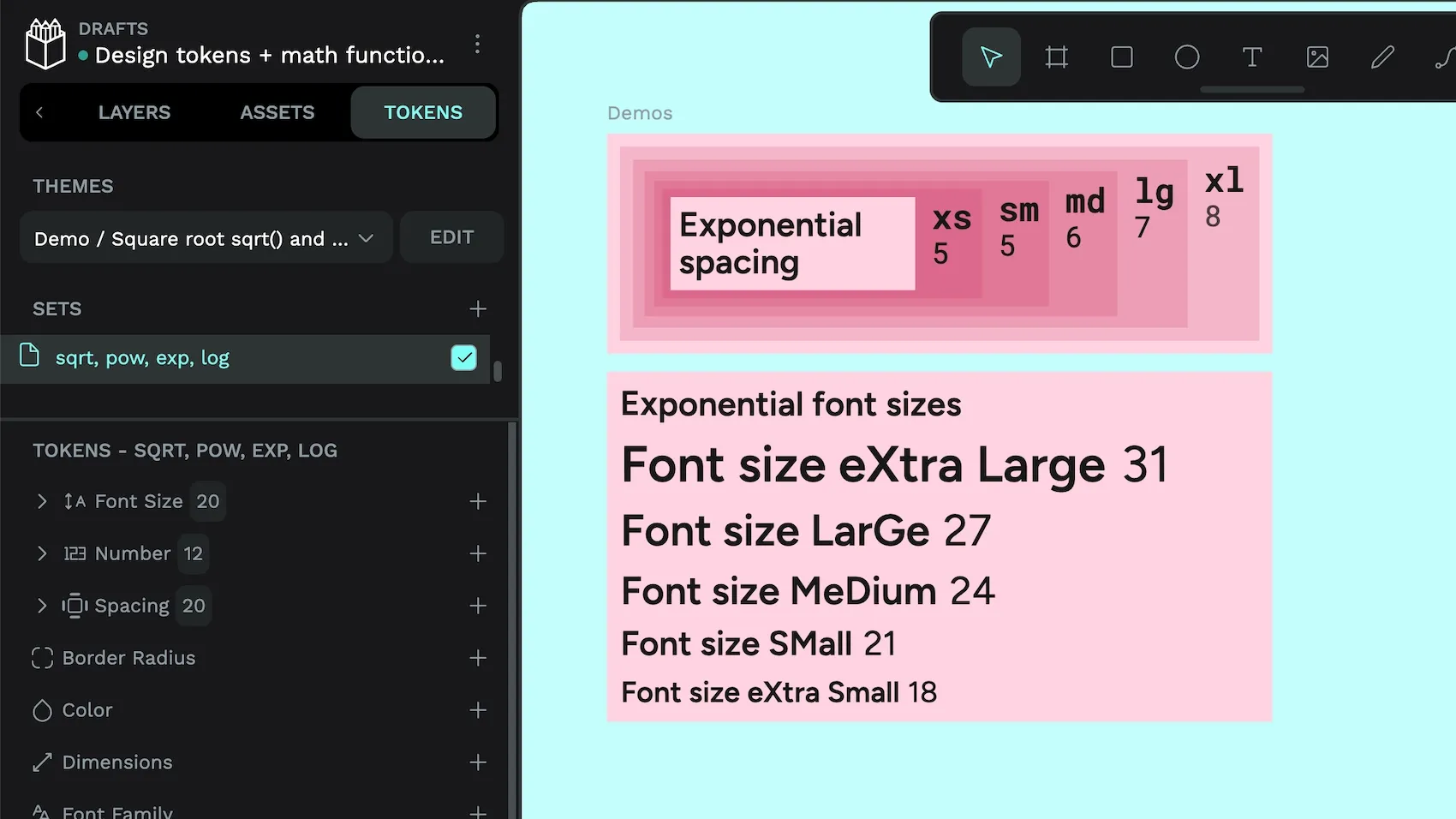
exp(): Increasingly dramatic jumps between steps, proportion constrained with a fixed multiplier ratio."number": {
"scale": {
"multiplier": {
"exp": {
"$value": "0.1333",
"$type": "number",
"$description": "Number token, scale ratio, tweaked to normalize values produced by exp()"
}
}
}
}
"font-size": {
"exp": {
"xs": {
"$value": "round({number.base-font} * exp({number.scale.step.xs} * {number.scale.multiplier.exp}))",
"$type": "fontSizes",
"$description": "round(16 * exp(1 * 0.1333)) = round(16 * 1.1426) = round(18.2816) = 18"
},
"sm": {
"$value": "round({number.base-font} * exp({number.scale.step.sm} * {number.scale.multiplier.exp}))",
"$type": "fontSizes",
"$description": "round(16 * exp(2 * 0.1333)) = round(16 * exp(0.2666) = round(16 * 1.3055) = round(20.888) = 21"
},
"md": {
"$value": "round({number.base-font} * exp({number.scale.step.md} * {number.scale.multiplier.exp}))",
"$type": "fontSizes",
"$description": "round(16 * exp(3 * 0.1333)) = round(16 * exp(0.3999)) = round(16 * 1.4917) = round(23.8672) = 24"
},
"lg": {
"$value": "round({number.base-font} * exp({number.scale.step.lg} * {number.scale.multiplier.exp}))",
"$type": "fontSizes",
"$description": "round(16 * exp(4 * 0.1333)) = round(16 * exp(0.5332)) = round(16 * 1.7044) = round(27.2704) = 27"
},
"xl": {
"$value": "round({number.base-font} * exp({number.scale.step.xl} * {number.scale.multiplier.exp}))",
"$type": "fontSizes",
"$description": "round(16 * exp(5 * 0.1333)) = round(16 * exp(0.66653)) = round(16 * 1.9475) = round(31.16) = 31"
}
}
},
"spacing": {
"exp": {
"xs": {
"$value": "round({number.base-spacing} * exp({number.scale.step.xs} * {number.scale.multiplier.exp}))",
"$type": "spacing",
"$description": "round(4 * exp(1 * 0.1333)) = round(4 * exp(0.1333)) = round(4 * 1.1426) = round(4.5704) = 5"
},
"sm": {
"$value": "round({number.base-spacing} * exp({number.scale.step.sm} * {number.scale.multiplier.exp}))",
"$type": "spacing",
"$description": "round(4 * exp(2 * 0.1333)) = round(4 * exp(0.2666)) = round(4 * 1.3055) = round(5.222) = 6"
},
"md": {
"$value": "round({number.base-spacing} * exp({number.scale.step.md} * {number.scale.multiplier.exp}))",
"$type": "spacing",
"$description": "round(4 * exp(3 * 0.1333)) = round(4 * exp(0.3999)) = round(4 * 1.4917) = round(5.9668) = 6"
},
"lg": {
"$value": "round({number.base-spacing} * exp({number.scale.step.lg} * {number.scale.multiplier.exp}))",
"$type": "spacing",
"$description": "round(4 * exp(4 * 0.1333)) = round(4 * exp(0.5332)) = round(4 * 1.7044) = round(6.8176) = 7"
},
"xl": {
"$value": "round({number.base-spacing} * exp({number.scale.step.xl} * {number.scale.multiplier.exp}))",
"$type": "spacing",
"$description": "round(4 * exp(5 * 0.1333)) = round(4 * exp(0.6665)) = round(4 * 1.9474) = round(7.7896) = 8"
}
}
}sqrt(): The square root function produces a scale with larger jumps between the smaller steps and smaller jumps between the larger steps.
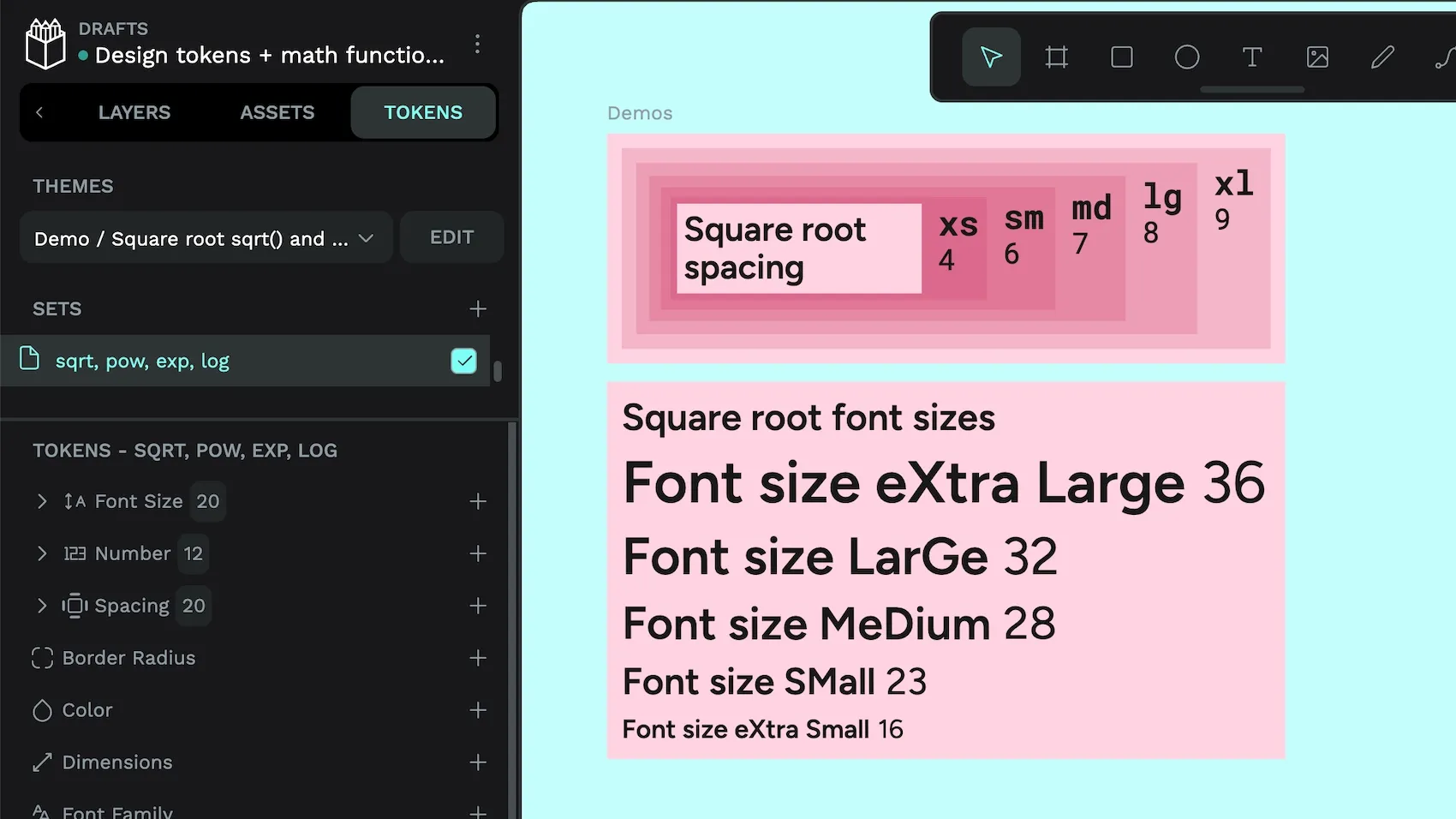
sqrt(): Dramatic jumps between smaller steps, subtle jumps between larger steps, no multiplier required."font-size": {
"sqrt": {
"xs": {
"$value": "round({number.base-font} * sqrt({number.scale.step.xs}))",
"$type": "fontSizes",
"$description": "round(16 * sqrt(1)) = round(16 * 1) = round(16) = 16"
},
"sm": {
"$value": "round({number.base-font} * sqrt({number.scale.step.sm}))",
"$type": "fontSizes",
"$description": "round(16 * 1.4142)) = round(22.6272)) = 23"
},
"md": {
"$value": "round({number.base-font} * sqrt({number.scale.step.md}))",
"$type": "fontSizes",
"$description": "round(16 * 1.7321) = round(16 * 1.7321) = round(27.7136) = 28"
},
"lg": {
"$value": "round({number.base-font} * sqrt({number.scale.step.lg}))",
"$type": "fontSizes",
"$description": "round(16 * sqrt(4)) = round(16 * 2) = round(32) = 32"
},
"xl": {
"$value": "round({number.base-font} * sqrt({number.scale.step.xl}))",
"$type": "fontSizes",
"$description": "round(16 * sqrt(5)) = round(16 * 2.2361) = round(16 * 2.2361) = 36"
}
}
},
"spacing": {
"sqrt": {
"xs": {
"$value": "round({number.base-spacing} * sqrt({number.scale.step.xs}))",
"$type": "spacing",
"$description": "round(4 * sqrt(1)) = round(4 * 1) = round(4) = 4"
},
"sm": {
"$value": "round({number.base-spacing} * sqrt({number.scale.step.sm}))",
"$type": "spacing",
"$description": "round(4 * sqrt(2)) = round(4 * 1.4142) = round(5.6568) = 6"
},
"md": {
"$value": "round({number.base-spacing} * sqrt({number.scale.step.md}))",
"$type": "spacing",
"$description": "round(4 * sqrt(3)) = round(4 * 1.7321) = round(6.9284) = 7"
},
"lg": {
"$value": "round({number.base-spacing} * sqrt({number.scale.step.lg}))",
"$type": "spacing",
"$description": "round(4 * sqrt(4)) = round(4 * 2) = round(8) = 8"
},
"xl": {
"$value": "round({number.base-spacing} * sqrt({number.scale.step.xl}))",
"$type": "spacing",
"$description": "round(4 * sqrt(5)) = round(4 * 2.2361) = round(8.9444)= 9"
}
}
}log(): The logarithmic function (natural log, base e) creates a scale that again has a great difference in the smaller steps, but even less of a difference in the larger steps than the square root function. This function is ideal if you want to stop your larger sizes getting out of control.
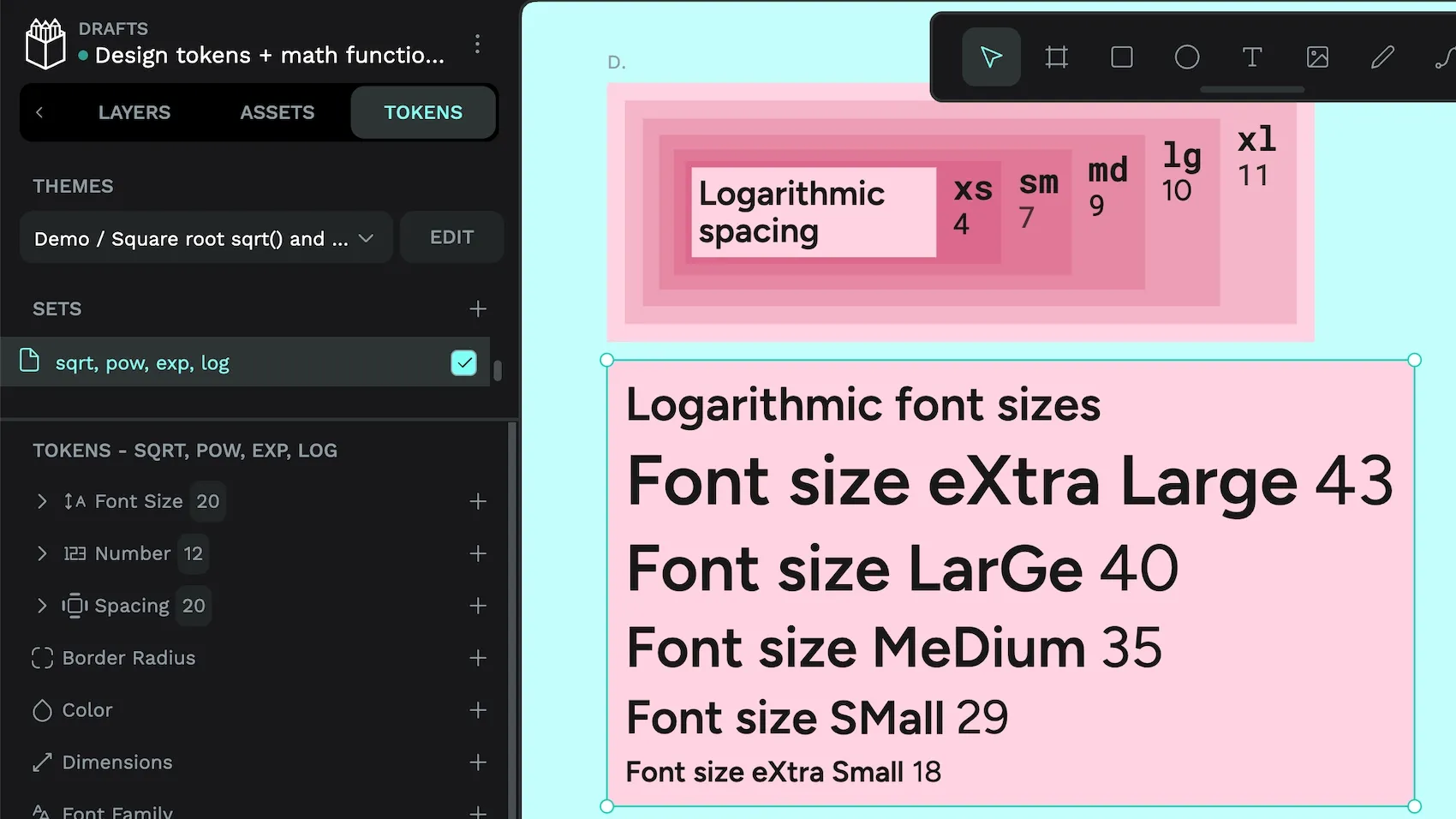
log(): Dramatic jumps between smaller steps, very subtle jumps between larger steps, uses a multiplier to prevent values collapsing to 0."number": {
"scale": {
"multiplier": {
"log": {
"$value": "1.1",
"$type": "number",
"$description": "Number token, scale ratio, tweaked to normalize values produced by log()"
}
}
}
}
"font-size": {
"log": {
"xs": {
"$value": "round({number.base-font} * ({number.scale.multiplier.log} + log({number.scale.step.xs})))",
"$type": "fontSizes",
"$description": "round(16 * (1.1 + log(1))) = round(16 * (1.1 + 0)) = round(16 * 1.1) = round(17.6) = 18"
},
"sm": {
"$value": "round({number.base-font} * ({number.scale.multiplier.log} + log({number.scale.step.sm})))",
"$type": "fontSizes",
"$description": "round(16 * (1.1 + log(2))) = round(16 * (1.1 + 0.6931)) = round(16 * 1.7931) = round(28.6896) = 29"
},
"md": {
"$value": "round({number.base-font} * ({number.scale.multiplier.log} + log({number.scale.step.md})))",
"$type": "fontSizes",
"$description": "round(16 * (1.1 + log(3))) = round(16 * (1.1 + 1.0986)) = round(16 * 2.1986) = round(35.1776)) = 35"
},
"lg": {
"$value": "round({number.base-font} * ({number.scale.multiplier.log} + log({number.scale.step.lg})))",
"$type": "fontSizes",
"$description": "round(16 * (1.1 + log(4))) = round(16 * (1.1 + 1.3863)) = round(16 * 2.4863) = round(39.7808) = 40"
},
"xl": {
"$value": "round({number.base-font} * ({number.scale.multiplier.log} + log({number.scale.step.xl})))",
"$type": "fontSizes",
"$description": "round(16 * (1.1 + log(5))) = round(16 * (1.1 + 1.6094)) = round(16 * 2.7094) = round(43.3504) = 43"
}
}
},
"spacing": {
"log": {
"xs": {
"$value": "round({number.base-spacing} * ({number.scale.multiplier.log} + log({number.scale.step.xs})))",
"$type": "spacing",
"$description": "round(4 * (1.1 + log(1))) = round(4 * (1.1 + 0)) = round(4 * 1.1) = round(4.4) = 4"
},
"sm": {
"$value": "round({number.base-spacing} * ({number.scale.multiplier.log} + log({number.scale.step.sm})))",
"$type": "spacing",
"$description": "round(4 * (1.1 + log(2))) = round(4 * (1.1 + 0.6931)) = round(4 * 1.7931) = round(7.1724) = 7"
},
"md": {
"$value": "round({number.base-spacing} * ({number.scale.multiplier.log} + log({number.scale.step.md})))",
"$type": "spacing",
"$description": "round(4 * (1.1 + log(3))) = round(4 * (1.1 + 1.0986)) = round(4 * 2.1986) = round(8.7944) = 9"
},
"lg": {
"$value": "round({number.base-spacing} * ({number.scale.multiplier.log} + log({number.scale.step.lg})))",
"$type": "spacing",
"$description": "round(4 * (1.1 + log(4))) = round(4 * (1.1 + 1.3863)) = round(4 * 2.4863) = round(9.9452) = 10"
},
"xl": {
"$value": "round({number.base-spacing} * ({number.scale.multiplier.log} + log({number.scale.step.xl})))",
"$type": "spacing",
"$description": "round(4 * (1.1 + log(5))) = round(4 * (1.1 + 1.6094)) = round(4 * 2.7094) = round(10.8376) = 11"
}
}
}Best practices for math functions in design tokens
When writing math equations in token values, you should consider how you write the equations as well as the performance of which tokens contain calculations:
- Complex formulas require spaces between operators to ensure tokens are transformed correctly. For example, use
8 * 8instead of8*8. - If you are using the same calculation multiple times, consider creating it as its own token with the number type, and then referencing that token in other tokens. This will improve the performance of your design tokens, as Penpot only runs the calculation once.
- Consider whether your calculations can live inside your design tokens or whether they might need to be calculated on the fly in your final production code. You might want to use these functions dynamically in your final code, for example, responding to the current viewport width and height. In that case, you'll want to make sure those functions are supported (or translatable) in the production code language.
Marco and I discussed token performance in this hands-on demo.
There are plenty more math functions in Penpot’s user guide. But I haven’t yet come up with practical use cases for them! (The 15-year-old math student inside me gets bad flashbacks when you start talking about sin(), cos(), and tan().) If you’ve got the trigonometry working for you, or used atan(x) and atan2(y, x) in your projects, please let me know in the Penpot community.
Related Blogs
If you want to dive further into design tokens and Penpot, here’s some more posts you might find interesting:
 Laura Kalbag
 Laura Kalbag
 Laura Kalbag